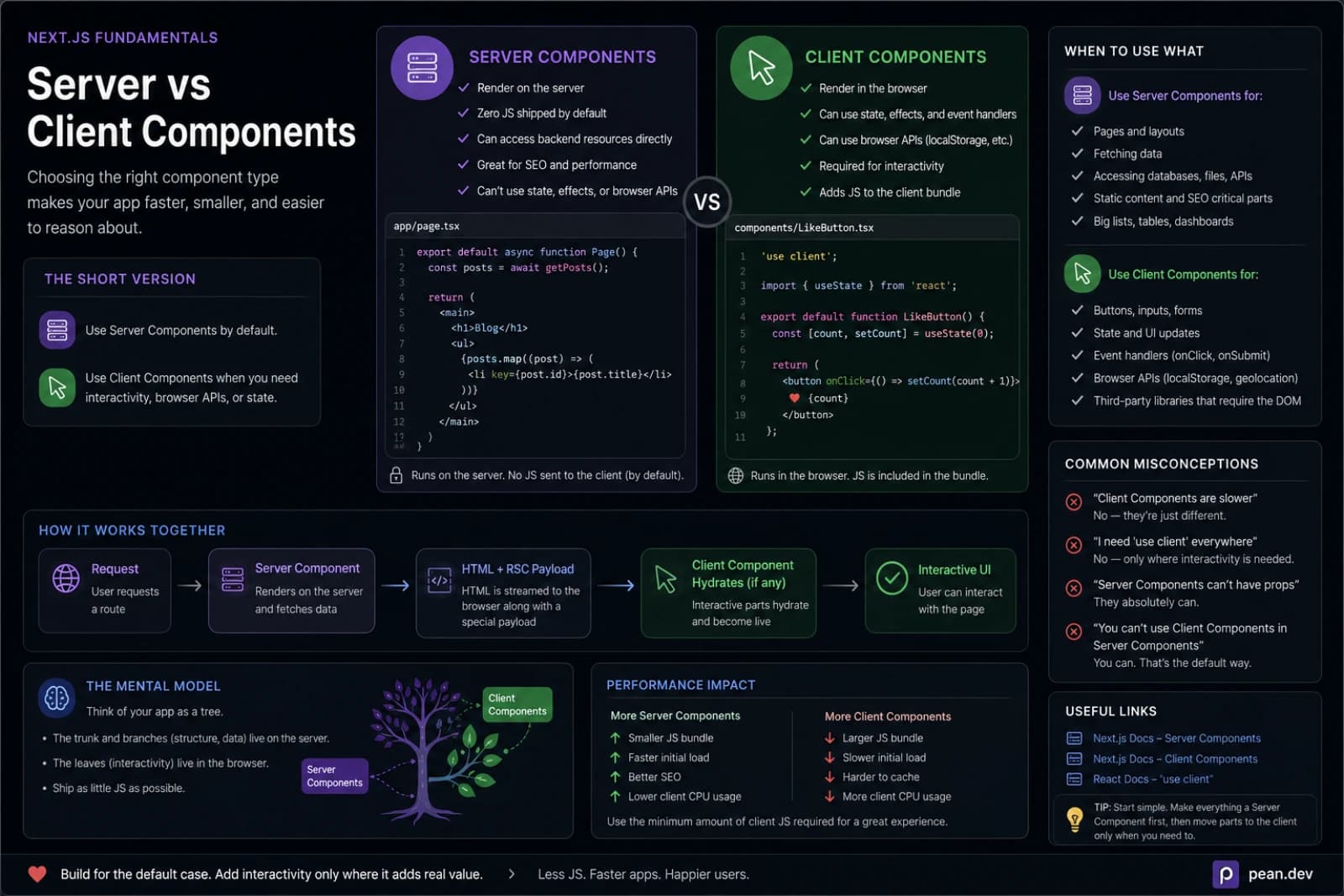
When I first moved to the Next.js App Router, I treated Server Components like a new rule I had to obey.
Keep everything on the server. Add 'use client' only when absolutely
necessary. Minimize JavaScript. Ship less. Hydrate less.
That part is correct.
But after building real screens with filters, forms, search, modals, navigation, and optimistic updates, I realized the mental model was incomplete. The hard part is not knowing that Server Components are the default. The hard part is knowing where the boundary should be.
That boundary decides whether a page feels fast or clumsy, whether your data loading stays simple or turns into glue code, and whether your components remain composable six months later.
So these are the rules I actually use.
The rule that changed how I build
I no longer ask:
Should this page use Server Components or Client Components?
I ask:
What is the smallest interactive island I can get away with?
That one question is usually enough.
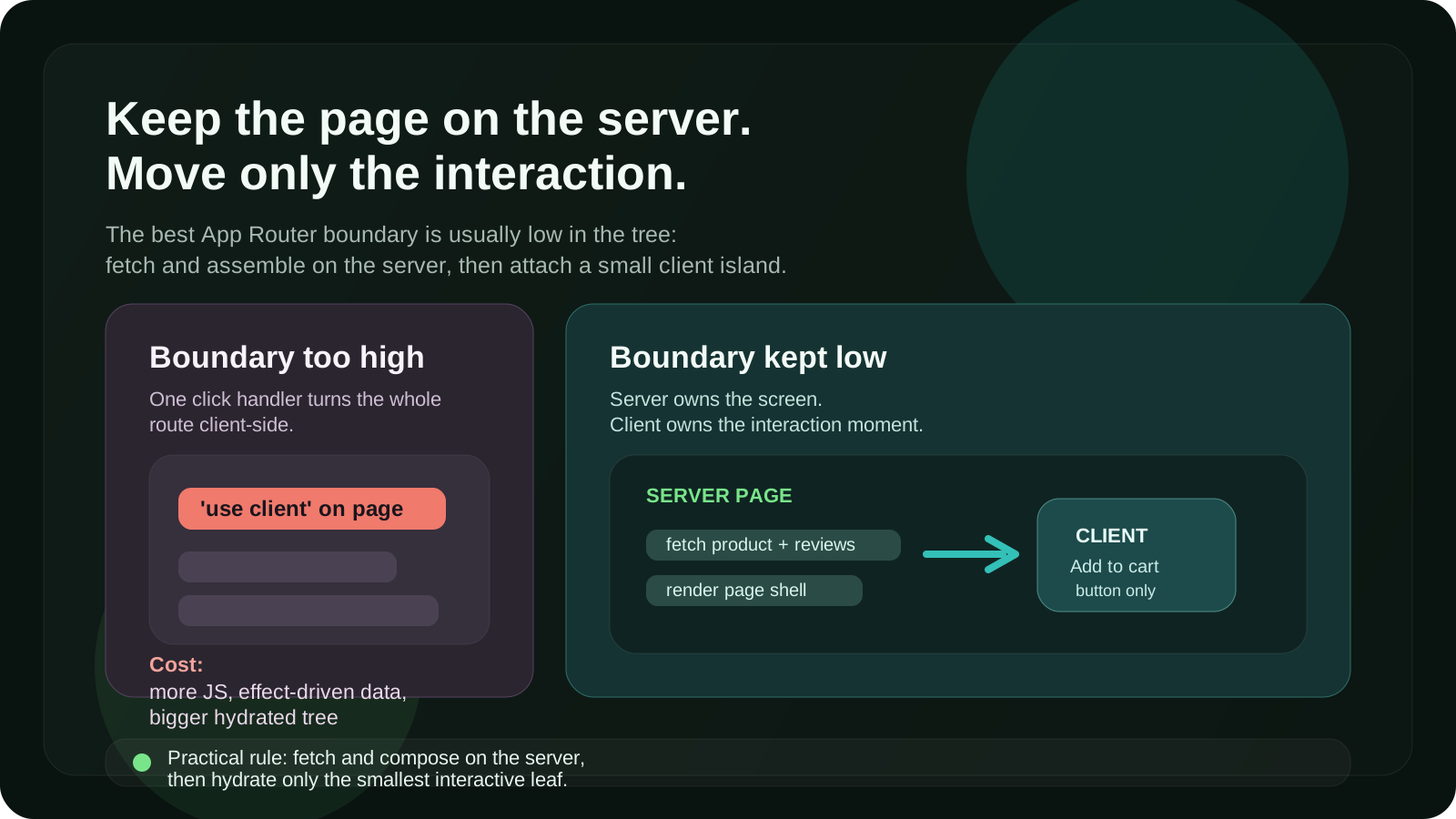
A lot of App Router mistakes come from making the boundary too high in the tree.
You add 'use client' to a page or a large layout because one button needs a
click handler. Then half the route becomes client-side by accident. Data loading
gets pushed into effects. Large libraries end up in the browser bundle. And the
page that should have streamed nicely becomes a giant hydrated block.
My default is simple:
- Fetch and assemble on the server
- Add interactivity in small client leaves
- Keep the boundary low
That is the biggest win I have gotten from the App Router.
Rule 1: Start on the server unless the browser is required
I start every new component as a Server Component.
Not because it is trendy, but because it keeps the first version honest. If the component does not need state, effects, event handlers, refs, or browser APIs, there is usually no reason to pay the client cost for it.
This is what I keep on the server by default:
- data fetching
- access checks
- token or secret-dependent logic
- page shells
- layout composition
- content rendering
- expensive formatting or mapping logic
- large dependencies the user does not need in the browser
This approach gives you a cleaner tree almost for free. It also prevents the common mistake where a presentational block becomes client-side only because it was placed next to an interactive widget.
A product card, article body, sidebar section, dashboard table wrapper, pricing page, or read-only settings summary usually starts on the server for me. Then I attach small client parts only where interaction begins.
Rule 2: Use 'use client' for capability, not convenience
There are only a few real reasons I move a component to the client:
- it uses
useState,useReducer,useEffect, oruseRef - it needs event handlers like
onClickoronChange - it depends on browser APIs such as
window,localStorage, or media queries - it wraps a third-party interactive library
- it needs immediate in-browser feedback before a round trip completes
That sounds obvious, but the important detail is this: I do not use
'use client' just because passing props feels annoying.
That is usually a smell.
If I find myself moving a whole section to the client to avoid thinking about composition, I stop and split it instead.
A good example is a searchable page.
The page itself can stay on the server. The initial data can be fetched on the server. The heading, metadata, filters shell, results shell, and empty state can all stay on the server. Only the interactive search input, filter toggles, or a small client controller may need to run in the browser.
That keeps the route fast on first load and still lets the interaction feel native.
Rule 3: Keep the client boundary as low as possible
This is the rule I break the least.
If only one child needs interactivity, only that child gets 'use client'.
Not the parent. Not the whole section. Definitely not the page unless there is a
very good reason.
Bad:
'use client'

export default function ProductPage() {
  return (
    <main>
      <ProductDetails />
      <Reviews />
      <AddToCartButton />
    </main>
  )
}
Better:
export default async function ProductPage() {
  const product = await getProduct()

  return (
    <main>
      <ProductDetails product={product} />
      <Reviews productId={product.id} />
      <AddToCartButton productId={product.id} />
    </main>
  )
}
'use client'
export function AddToCartButton({ productId }: { productId: string }) {
return <button>Add to cart</button>
}This pattern solves multiple problems at once:
- less JavaScript reaches the browser
- more of the route can render and stream earlier
- data loading stays server-first
- the client component becomes easier to reuse and test
When I review App Router code, the question I ask most often is:
Does this parent really need to be client-side, or are we just being lazy?
That one catches a lot.
Rule 4: Prefer server data flow over client fetch waterfalls
One of the easiest ways to make a Next.js app feel worse is to fetch important
page data in useEffect.
You render a shell. Then the browser loads JavaScript. Then hydration finishes. Then the effect runs. Then the fetch starts. Then the page updates.
That is a lot of waiting for data that the server could have loaded earlier.
Whenever the data is needed to render the route, I fetch it on the server first. Then I pass the result down into client components as props.
That keeps the first paint meaningful and removes a surprising amount of loading state noise.
I still fetch on the client when the data is truly client-driven:
- live search suggestions while typing
- hover or focus-driven previews
- UI state that changes too frequently to bounce through the server each time
- background refresh after the initial render
But for the main route content, server-first wins most of the time.
Rule 5: Use client components for interaction, not ownership of the whole screen
A useful distinction:
- Server Components own the screen structure
- Client Components own interaction moments
That mental split makes large pages easier to reason about.
For example, on a dashboard page I want the server to own:
- the route shell
- the fetched records
- the summary numbers
- the default sort and filters from the URL
- permissions and feature gating
Then I let client components own:
- dropdown open state
- local input state
- inline edit mode
- modal visibility
- drag and drop
- instant optimistic feedback
The mistake is letting the interaction layer become the page owner. Once that happens, everything tends to get pulled toward browser-only patterns even when it should not.
Rule 6: Suspense is part of architecture, not just a loading spinner
The App Router becomes much more interesting once you stop thinking about Suspense as a visual detail.
A good Suspense boundary is an architectural boundary. It lets the server send a useful shell early while slower parts continue rendering. That changes how the page feels even when total backend work stays the same.
So I try to place boundaries around meaningful chunks:
- the analytics panel separate from the main summary
- related items separate from product details
- comments separate from the article body
- slow charts separate from quick textual stats
This is where server/client decisions connect directly to UX. A thin client island inside a well-placed Suspense boundary is usually much better than a huge interactive tree that blocks the whole route.
If part of the page can arrive later without harming understanding, I isolate it. That is usually worth more than micro-optimizing a few lines of component code.
Rule 7: Use optimistic UI deliberately, not everywhere
Optimistic UI is one of those ideas that sounds universally good until you add it to every form and toggle.
I only use it when the user benefits from immediate feedback and the rollback story is manageable.
Good candidates:
- liking or saving something
- adding an item to a lightweight list
- toggling a preference
- reordering small collections
Bad candidates:
- flows with complicated server validation
- destructive operations with many downstream effects
- anything where reconciliation would be confusing to the user
The existence of Server Functions makes this easier than older client-only form patterns, but the product decision still matters. Fast feedback is good. False certainty is not.
Rule 8: Watch out for hidden client creep
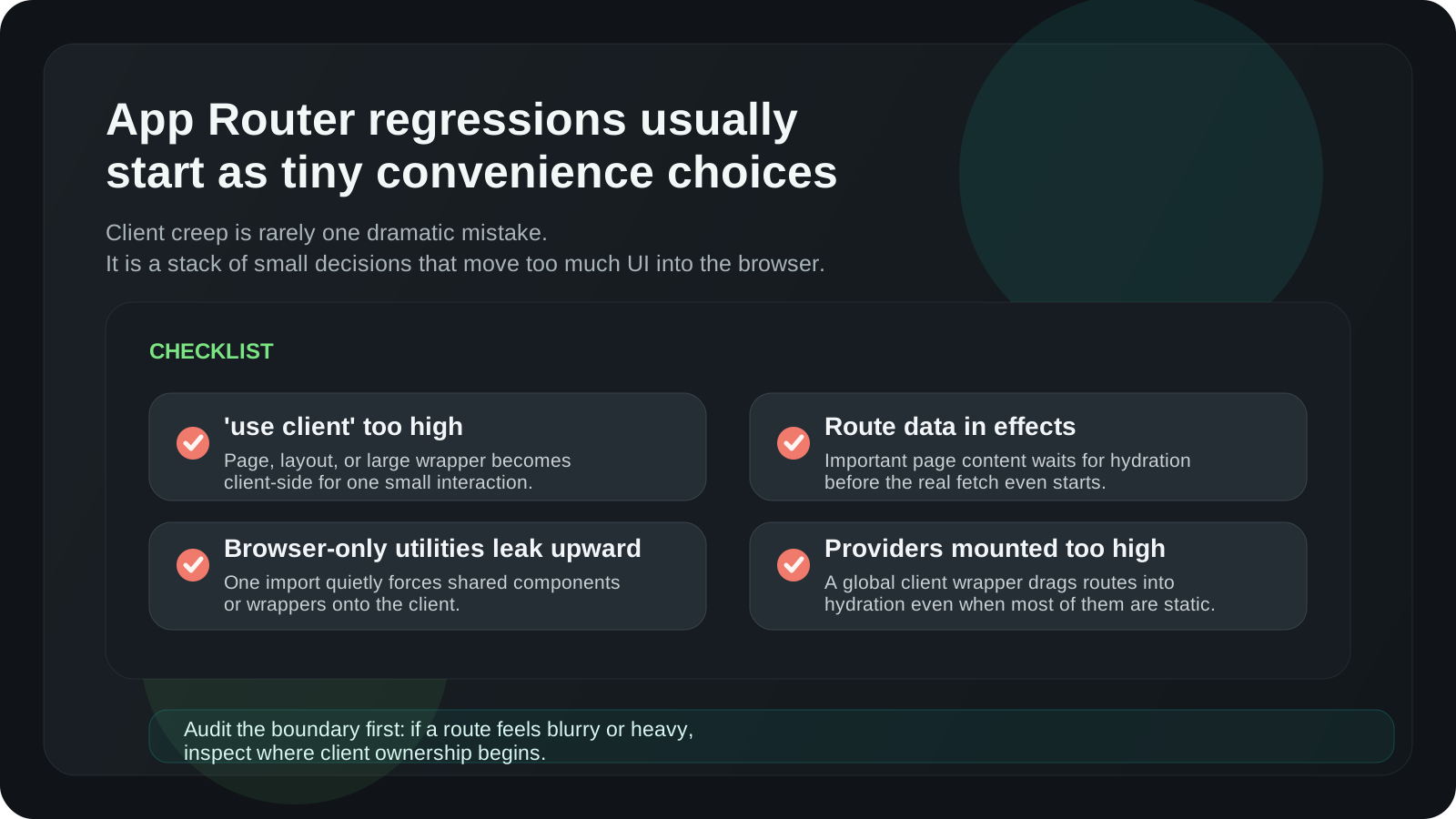
The biggest App Router regressions I see are not dramatic architectural failures. They are small convenience choices that quietly move too much code to the client.
Usually it starts like this:
- a utility imports a browser-only package
- a shared component gains one small click handler
- a top-level wrapper gets
'use client' - a provider is mounted too high
- data that could come from the server gets re-fetched in the browser
None of those look huge on their own. Together they turn a crisp server-first route into a blurry hybrid with all the costs of both models.
When something feels off in an App Router codebase, I inspect the boundaries before I inspect the algorithm.
The practical exceptions
There are absolutely pages where I go client-heavy on purpose.
Sometimes the screen behaves more like an application surface than a document:
- complex visual editors
- drag-heavy kanban boards
- highly interactive maps
- advanced offline-first flows
- real-time collaborative surfaces
In those cases, fighting for a server-heavy tree can make the code worse, not better.
So the point is not to be ideological.
The point is to be intentional.
If a route is basically an interactive app once it loads, I accept that and design
for it. But I want that to be a conscious choice based on the experience, not an
accident caused by placing 'use client' too high.
The rules in one list
If I had to reduce the whole thing to a checklist, it would be this:
- Start on the server.
- Move to the client only when the browser is genuinely required.
- Keep the
'use client'boundary as low as possible. - Fetch route-defining data on the server.
- Let the server own structure and the client own interaction.
- Use Suspense to separate meaningful chunks.
- Add optimistic UI only where rollback is simple.
- Audit for hidden client creep.
That is the framework I keep coming back to.
Not because it is academically pure, but because it leads to codebases that stay faster, simpler, and easier to change.
Final thought
The most useful shift for me was realizing that Server and Client Components are not two competing styles.
They are a composition tool.
The server is excellent at assembling the page, fetching data, protecting sensitive logic, and sending useful HTML early. The client is excellent at interactions, local state, and immediate feedback.
Good App Router architecture is mostly about respecting that split.
Once I stopped asking "which side should this page live on?" and started asking "where does interaction actually begin?" the decisions got much easier.
And in practice, that is the rule that has saved me the most time.
For the larger structure around that boundary — data access, Server Actions, Route Handlers, authorization, and caching — read Next.js App Router Architecture in 2026.
Discussion
Responses
No approved responses yet.