
Imagine asking an AI agent to help with an unhappy customer.
The agent reads the conversation, checks the order, sees that the delivery was late, writes a thoughtful apology, refunds the payment, and sends the message.
The result looks good. The customer is probably satisfied. The agent even saved someone ten minutes of work.
There is just one problem: nobody asked it to send anything or issue a refund.
This is the line that becomes important when an AI feature stops being a box that produces text and starts becoming a system that can do things.
A weak product treats every tool call as another technical capability. A good product asks a harder question first:
When should the agent act, when should it ask, and when should it refuse to continue?
That is what human-in-the-loop design is really about.
It is not about putting a confirmation dialog in front of every click. It is about giving an agent enough freedom to be useful without quietly transferring important decisions away from the person who will live with the result.
Human in the loop does not mean human approves everything
The phrase sounds more complicated than the idea.
A human-in-the-loop system is a system where a person can review, correct, or approve the agent's work at the moments where human judgment matters.
The important part is at the moments where it matters.
If an agent has to ask before reading every file, searching every document, or checking every order status, it is barely an agent. The user becomes a button that the system presses every thirty seconds.
If the agent never asks, it may feel wonderfully fast right up until it sends the wrong email, edits the wrong record, or deletes something that cannot be restored.
Neither extreme is good product design.
The useful middle looks more like this:
- let the agent gather information freely inside a clearly defined scope;
- let it prepare drafts, plans, and proposed changes;
- pause before actions with meaningful external consequences;
- block actions the system should never perform;
- make it easy for a person to see, change, or stop what is happening.
That is not less autonomous. It is appropriately autonomous.
The real difference is not between reading and writing
Teams often begin with a simple rule:
Reads are safe. Writes need approval.
It is a reasonable starting point, but it does not survive contact with a real product.
Some reads are highly sensitive. Opening a public help article is not the same as retrieving a customer's medical record. Some writes are harmless and easy to reverse. Adding an internal label to a support ticket is not the same as sending a message to the customer.
I find it more useful to look at the consequence of the action.
For any tool the agent can use, I ask five questions:
- Can the action be reversed? If it goes wrong, can we restore the previous state without damage?
- Who can see the result? Is it private to the user, visible to a team, or sent to someone outside the product?
- Does it touch money, access, or sensitive data? A small-looking action can carry a large consequence.
- Is the user's intent specific enough? “Help with this customer” is not permission to refund an order.
- How much can one mistake affect? Editing one draft and emailing ten thousand people are both writes, but they are not the same kind of write.
This changes the conversation. Instead of debating whether a tool is generally safe, we define which uses of that tool are safe in this particular product.
A practical ladder for agent actions
I like to classify actions into five levels. The names are not important. The separation is.
1. Observe
The agent reads information without changing the world.
Examples include searching documentation, reading a public page, checking an order status, or inspecting files inside the repository the user selected.
These actions can usually run automatically, as long as normal access controls still apply. “The agent may read it” must never mean “the user may bypass the permissions they already have.”
2. Prepare
The agent creates something private and reviewable: a draft email, a proposed code change, a refund calculation, or a plan.
This is where AI agents are often most useful. They can do substantial work without creating an external consequence.
The product should make the draft visible and editable. Preparing a message is not the same as sending it. Calculating a refund is not the same as moving money.
3. Change something reversible
The agent updates state, but the change has a small scope and a reliable undo path.
It might add a label, move a task between internal columns, rename a private draft, or update a local file that is already under version control.
Some products can safely automate these actions. Others should ask first. The decision depends on scope, permissions, and how trustworthy the undo path really is.
An “undo” button that works only for five seconds is not much protection for a background agent that finishes while the user is away.
4. Create an external consequence
The agent sends, publishes, deploys, charges, books, invites, refunds, or changes something other people rely on.
This is where I normally want an explicit approval.
The approval should show the exact action, not a vague question like “Continue?” The user needs to know what will happen, who or what will be affected, and whether the result can be undone.
5. Perform a destructive or highly sensitive action
The agent deletes important data, changes access rights, reveals private information, makes a large financial decision, or performs another action where one mistake can cause serious harm.
These actions need a hard gate. Some should require a second identity check or a different role. Some should remain unavailable to the agent entirely.
The fact that a model can call a tool does not mean the product should expose that tool. As I wrote in MCP Is Not the Product, connecting an agent to more systems is infrastructure. Deciding what it may do inside those systems is the product.
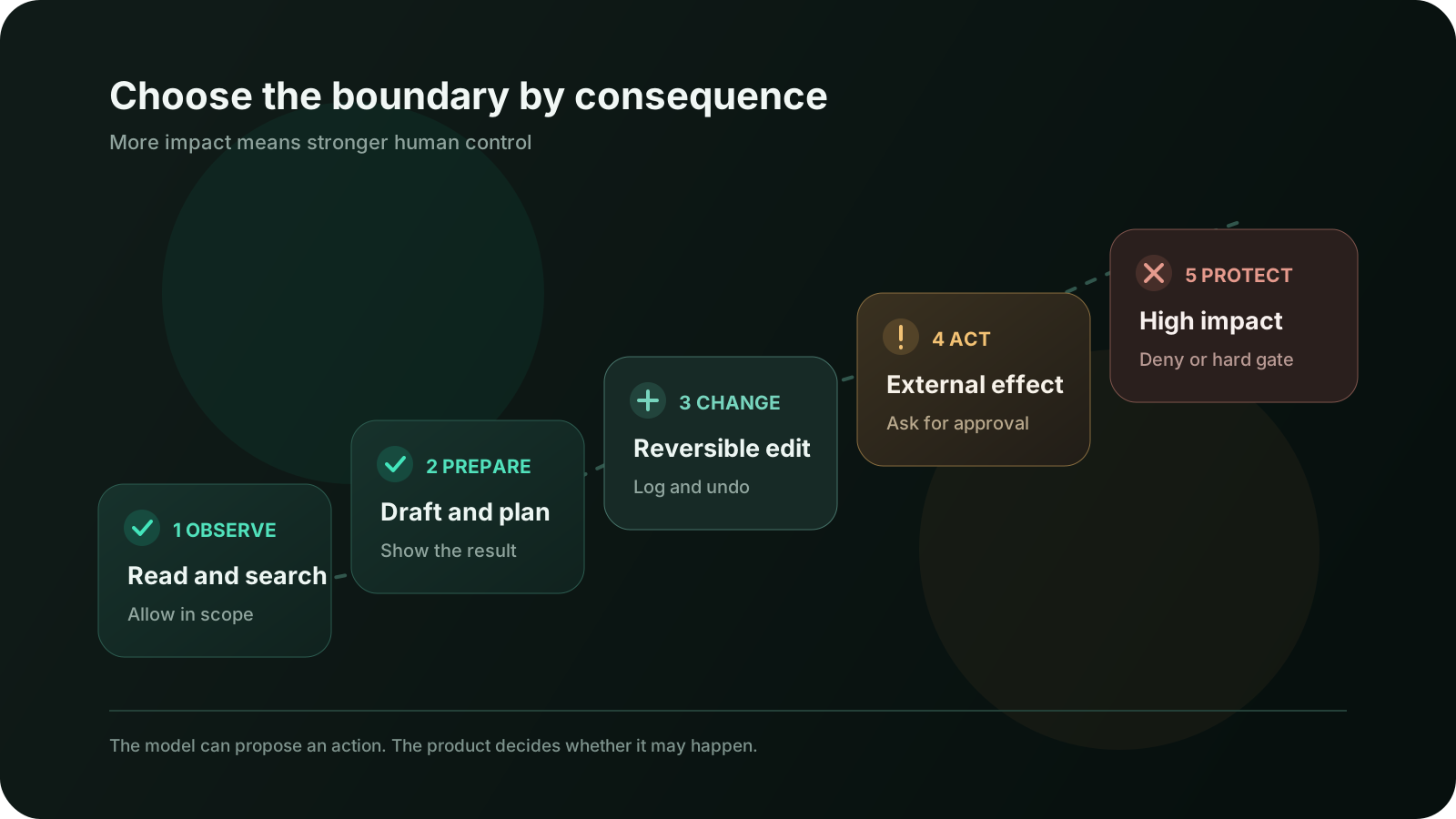
This ladder is intentionally about consequences, not model confidence. A model that sounds extremely certain can still have misunderstood the user, selected the wrong account, or received stale data.
Confidence is useful context. It is not permission.
Guardrails and approvals solve different problems
The words often get mixed together, so it helps to separate them.
A guardrail is an automatic check. It validates input, output, tool arguments, permissions, scope, or policy. It can allow the operation, reject it, or send it down a safer path.
An approval is a decision made by a person before a particular action is executed.
You need both because they catch different kinds of problems.
A guardrail can notice that a refund exceeds the allowed limit, that an email contains a credit card number, or that the agent is trying to access a project outside the user's workspace.
A person can notice that the technically valid refund is still the wrong thing to do, that the message sounds insensitive, or that the user meant a different customer with the same name.
The OpenAI documentation on guardrails and human review describes the same separation: automatic guardrails validate behavior, while human review pauses a sensitive action for approval or rejection.
One should not be used as a decorative substitute for the other.
If the user must approve obviously invalid actions, the guardrails are too weak. If a classifier silently approves consequential actions because they look normal, human judgment has disappeared from the workflow.
Put the check next to the consequence
A common mistake is to put all safety logic around the initial prompt.
The system checks the user's request, decides it looks harmless, and then gives the agent access to a chain of tools. Ten steps later, the agent calls a tool that changes production data.
The original request may have been safe. The final action may not be.
This matters because an agent's plan can change while it works. Tool results add new information. A retrieved page may contain malicious instructions. The agent may choose a broader action than the user expected.
The strongest check belongs at the boundary where the side effect happens.
If sendEmail() can contact a customer, validate the recipient, sender,
content, tenant, permissions, and approval immediately before sending. If
deployToProduction() changes the live application, enforce the production
policy inside that tool path, not only in the prompt that started the run.
The model may propose an action. Normal application code should decide whether that action is allowed.
That distinction is small in architecture diagrams and enormous in production.
I do not let the model invent its own permission policy
The agent can help classify an unusual situation, but I do not want it to be the only thing deciding whether its own action is safe.
The core policy should be boring, visible code.
Here is a deliberately simplified example:
type Decision = 'allow' | 'review' | 'deny'

type Action =
  | { type: 'search_docs'; workspaceId: string }
  | { type: 'draft_email'; ticketId: string }
  | { type: 'send_email'; ticketId: string; recipient: string }
  | { type: 'refund_order'; orderId: string; amount: number }
  | { type: 'delete_customer'; customerId: string }

function decide(action: Action, context: UserContext): Decision {
  if (!context.allowedWorkspaceIds.includes(resourceScope(action))) {
    return 'deny'
  }

  switch (action.type) {
    case 'search_docs':
    case 'draft_email':
      return 'allow'

    case 'send_email':
      return 'review'

    case 'refund_order':
      return action.amount <= context.refundLimit ? 'review' : 'deny'

    case 'delete_customer':
      return 'deny'
  }
}
Real policies have more context than this. They consider user roles, tenant boundaries, data sensitivity, rate limits, resource ownership, action volume, and sometimes the current state of the object.
But the principle stays simple:
The model chooses what it wants to do. The product decides what it is allowed to do.
That rule also makes the system easier to test. You can verify that every
send_email request pauses, every out-of-scope resource is rejected, and every
large refund fails closed without hoping the model remembers a sentence from
the system prompt.
A useful approval is a small decision, not a legal document
Many approval screens fail in one of two ways.
The first is too vague:
The agent wants to use a tool. Allow?
The second is too technical:
Execute
customer_message.sendwith arguments{...}?
Neither helps a normal person understand the consequence.
A useful approval answers five questions quickly:
- What exactly will happen?
- Who or what will be affected?
- Why does the agent think this is needed?
- What important information will be used?
- Can the action be undone?
For example:
Send this reply to Maya Chen?
The message apologizes for order #1842 arriving late and offers free shipping on the next order. It will be sent from support@company.com. No refund will be issued. You can edit the message before sending, but the email cannot be recalled afterward.
That is an actual decision.
“Allow tool” is not.
The buttons matter too. Send reply and Keep as draft are clearer than
Approve and Reject. They describe outcomes instead of asking the user to
understand the agent framework.
Approval must be tied to the exact action
An approval should not become a reusable blank cheque.
If a user approves a €40 refund for order #1842, the agent has permission to perform that action once. It does not have general permission to refund any order, change the amount, or add a second action afterward.
I would store a proposed action with details such as:
type ProposedAction = {
  id: string
  type: 'refund_order'
  arguments: {
    orderId: string
    amount: number
    currency: string
  }
  requestedBy: string
  resourceVersion: number
  expiresAt: string
  idempotencyKey: string
}
The approval refers to that immutable proposal.
Before execution, the server should still check that:
- the approving person has permission now;
- the order still exists and is in the expected state;
- the amount and recipient have not changed;
- the approval has not expired;
- the same action has not already been executed.
This protects against a surprisingly common problem: the world changes while an approval is waiting.
Perhaps another support agent already refunded the order. Perhaps the user's role changed. Perhaps the original draft was edited. Resuming yesterday's approval against today's state can be more dangerous than the original AI mistake.
Preview and undo are part of the safety system
Human oversight is often discussed as if approval were the only interface that matters.
It is not.
A preview lets the user catch a problem before it happens. An undo path reduces the cost of a problem after it happens. A clear activity log lets everyone understand what happened later.
These mechanisms support different moments:
- Preview answers “What is about to happen?”
- Approval answers “Should it happen?”
- Progress answers “What is happening now?”
- Result answers “What actually happened?”
- Undo or recovery answers “What can we do if it was wrong?”
For a long-running action, the product also needs a stop button that really stops future steps. A decorative spinner with “AI is working” is not meaningful oversight.
This is especially important as users become more comfortable with agents. Anthropic's research on agent autonomy found that experienced Claude Code users approved actions automatically more often but also interrupted the agent more often. The interesting lesson is not that every product should copy a coding tool. It is that oversight can shift from approving every step to watching the work and intervening when it matters.
That only works when the product makes the agent's actions visible and easy to interrupt.
Too many approvals make the system less safe
If a person sees twenty approval prompts in five minutes, they stop reviewing them carefully.
They learn the rhythm: approve, approve, approve.
At that point the product has technically placed a human in the loop while removing most of the value of human judgment.
This is approval fatigue, and it is usually a sign that the action boundaries are poorly designed.
The answer is not to remove every checkpoint. It is to make each checkpoint meaningful.
I would reduce unnecessary prompts by:
- allowing low-risk reads within a clearly selected scope;
- grouping a set of predictable, reversible actions into one visible plan;
- asking once for a narrow time-bound permission instead of once per identical item;
- escalating only when the action changes scope, risk, recipient, or cost;
- letting users set preferences for familiar low-risk workflows;
- keeping destructive and externally visible actions separate.
Batch approval needs particular care.
“Apply these labels to 42 internal tickets” can be one decision if the user can inspect the rule and undo the result. “Send these 42 customers a message” needs a much clearer preview because each item creates an external consequence.
The number of tool calls is not the right unit. The consequence is.
Asking a question can be the best action
An agent does not always need an approval. Sometimes it needs missing context.
Consider this request:
Clean up old customer records.
The agent could guess that “old” means inactive for twelve months and “clean up” means delete.
It could also ask:
Do you want me to identify possible duplicates, archive inactive records, or permanently delete them? I can prepare a review list first.
That question is not a failure of autonomy. It is good judgment.
The ability to stop and clarify is an important part of human-in-the-loop design, especially when:
- the request supports several reasonable interpretations;
- the user has not named the target or scope;
- the available information conflicts;
- the action would be hard to reverse;
- the agent discovers a new consequence during execution.
But I would not rely only on the model to feel uncertain at the right time. Products should encode obvious ambiguity checks in normal code: missing recipient, unknown currency, multiple matching accounts, unspecified environment, empty selection, or unusually large scope.
Let the model ask good questions. Make the system enforce the questions that must be asked.
Safe recovery matters as much as safe approval
Even an approved action can fail.
The network can drop after the server completes a refund but before the agent receives the response. The agent sees a timeout and tries again. Now the same customer may receive two refunds.
Or an email provider may accept a message but return a delayed status. Or a deployment may complete halfway. Or the user may click the approval button twice because the interface appears frozen.
This is not primarily an AI problem. It is distributed systems with a more unpredictable caller.
The usual engineering protections still matter:
- use idempotency keys for actions that must happen once;
- record the requested action before execution;
- record the provider's result and external identifier;
- distinguish
pending,succeeded,failed, andunknownstates; - reconcile an unknown outcome before retrying;
- make compensating actions explicit when true rollback is impossible;
- never tell the user an action succeeded until the system has evidence.
The agent should not improvise recovery for money, access, data deletion, or external communication. Recovery should be part of the tool contract.
The user must be able to see what the agent did
“AI completed the task” is not enough.
For meaningful actions, the product should retain a useful record:
- what the user requested;
- what action the agent proposed;
- what checks ran;
- who approved it and when;
- which exact arguments were executed;
- what the external system returned;
- whether anything was changed, retried, or undone afterward.
This is not only for compliance or debugging.
It helps the user build an accurate mental model of the product. If the agent changed three records and skipped two because of missing permissions, say that. If it created drafts but sent nothing, say that. If one action has an unknown outcome, do not hide it inside a green success message.
Trust grows when the interface tells the truth about state.
Test the boundaries, not only the happy path
In my previous article about evaluating AI features, I argued that a polished demo is not evidence that a system is ready for real users.
Approval workflows need their own evaluation cases.
I would test at least these scenarios:
- a low-risk action runs without unnecessary friction;
- a consequential action always pauses before the side effect;
- the approval describes the actual target and arguments;
- editing the proposed action invalidates the old approval;
- an expired approval cannot be reused;
- revoked permissions are checked again before execution;
- a repeated click or retry does not duplicate the action;
- an unavailable reviewer causes the workflow to fail safely;
- a malicious document cannot talk the agent into bypassing the policy;
- a partial tool failure produces an honest state and a recovery path;
- a user can stop the next steps of a longer workflow;
- denied actions remain denied even if the model asks in a different way.
The test is not “Did a confirmation modal appear?”
The test is “Could the consequence happen without the right decision?”
That question catches much more.
What I would measure after launch
Pre-release tests show whether the designed boundary works. Production data shows whether people can live with it.
Useful signals include:
- how often actions require approval;
- how often users approve, reject, or edit them;
- how long approvals wait;
- which workflows people interrupt;
- how often an approved action is undone;
- which guardrails block valid work;
- which actions repeatedly fail or end in an unknown state;
- where users grant broader permissions after gaining experience;
- where users narrow permissions after something surprises them.
A high approval rate is not automatically good. It can mean the agent proposes the right actions. It can also mean people are approving without reading.
A high rejection rate is not automatically bad. It may reveal a useful checkpoint catching genuinely poor decisions.
Read samples. Look at the edits people make before approving. Ask whether the prompt appears at the right moment and contains enough information for a real decision.
Human-in-the-loop design is partly a policy problem, partly an engineering problem, and partly a user-interface problem. The metrics need the same mix.
A small team can start with a simple policy
You do not need a large governance department to improve a product's action boundaries.
For a new agent feature, I would start with this process:
- List every tool the agent can call.
- Describe the real-world consequence of each tool, including its largest possible scope.
- Mark which actions are private, external, reversible, sensitive, or destructive.
- Choose
allow,review, ordenyas the default for each action. - Put deterministic validation beside the tool that creates the side effect.
- Design the approval in plain language around the consequence.
- Add idempotency, state checks, logging, and a recovery path.
- Test bypasses, stale approvals, retries, and partial failures.
- Watch how real users approve, edit, reject, and interrupt.
The policy can begin as a TypeScript object in the repository. What matters is that it exists somewhere visible, testable, and owned.
Do not leave it spread across prompt wording, UI assumptions, and tribal knowledge.
A release checklist for safe agent actions
Before shipping an agent that can change anything meaningful, I want clear answers to these questions:
- Does the user understand what the agent can access?
- Does every tool enforce the user's real permissions?
- Are action boundaries based on consequences rather than tool names?
- Can the model propose an action without being able to authorize it?
- Are external, financial, sensitive, and destructive actions gated?
- Does the approval show the exact target, scope, and result?
- Is approval tied to immutable arguments and a specific user?
- Are permissions and resource state checked again at execution time?
- Can retries create duplicates?
- Can the user preview, edit, stop, or undo where appropriate?
- Does the system record what actually happened?
- Are unknown and partial outcomes represented honestly?
- Can untrusted tool output influence the policy decision?
- Have we tested how the workflow fails, not only how it succeeds?
If the answers are vague, the agent is probably being trusted through product copy instead of system design.
Human control should feel calm
The best human-in-the-loop experience does not feel like a security checkpoint appearing at random.
It feels predictable.
The agent handles the repetitive work. It gathers context, compares options, prepares the change, and explains its reasoning in useful terms. Then it stops at the point where the person's authority or judgment matters.
The person does not need to supervise every token or tool call. They need to understand the proposed consequence and have a real opportunity to change it.
That is the balance I would aim for.
Not maximum autonomy.
Not maximum friction.
The right action, with the right boundary, at the right moment.
Conclusion
An agent becomes valuable when it can move work forward.
It becomes trustworthy when it knows that moving forward and taking control are not the same thing.
Human-in-the-loop design is not a temporary compromise until models become smarter. Smarter models can handle more complicated work, which also means they can reach more consequential decisions. The need for clear authority does not disappear when capability improves.
Start with the consequence.
Let low-risk work flow. Let the agent prepare as much as it can. Put automatic checks next to every side effect. Ask for a human decision when money, people, privacy, access, or irreversible change is involved. Make approvals specific. Make actions observable. Make recovery real.
And when the user's intent is not clear, let the agent do something genuinely intelligent:
stop and ask.
FAQ
What does human in the loop mean for AI agents?
It means designing specific points where a person can review, correct, approve, or stop an agent's work. It does not mean requiring human approval for every model response or tool call.
What is the difference between a guardrail and an approval?
A guardrail is an automatic validation or policy check. An approval is a human decision about a specific proposed action. Guardrails should reject invalid or out-of-scope actions before they reach a person; approvals provide judgment for actions where context and consequences matter.
Which AI agent actions should require approval?
Actions that create external, financial, sensitive, destructive, or difficult to reverse consequences usually need approval. The exact boundary should also consider scope, user intent, permissions, and whether a reliable undo path exists.
Can an AI model decide whether its own action is safe?
It can provide a useful risk signal, but it should not be the only authority. Deterministic application code should enforce permissions, limits, scope, and mandatory approvals at the tool boundary.
How do you avoid approval fatigue?
Allow low-risk work within a clear scope, group predictable reversible actions, and ask only when the consequence meaningfully changes. Each approval should describe a real decision instead of exposing a technical tool call.
Is an approval enough to make an action safe?
No. The system still needs permission checks, exact and immutable action arguments, expiration, idempotency, state validation, honest result reporting, and a recovery plan for failures or unknown outcomes.
Discussion
Responses
No approved responses yet.