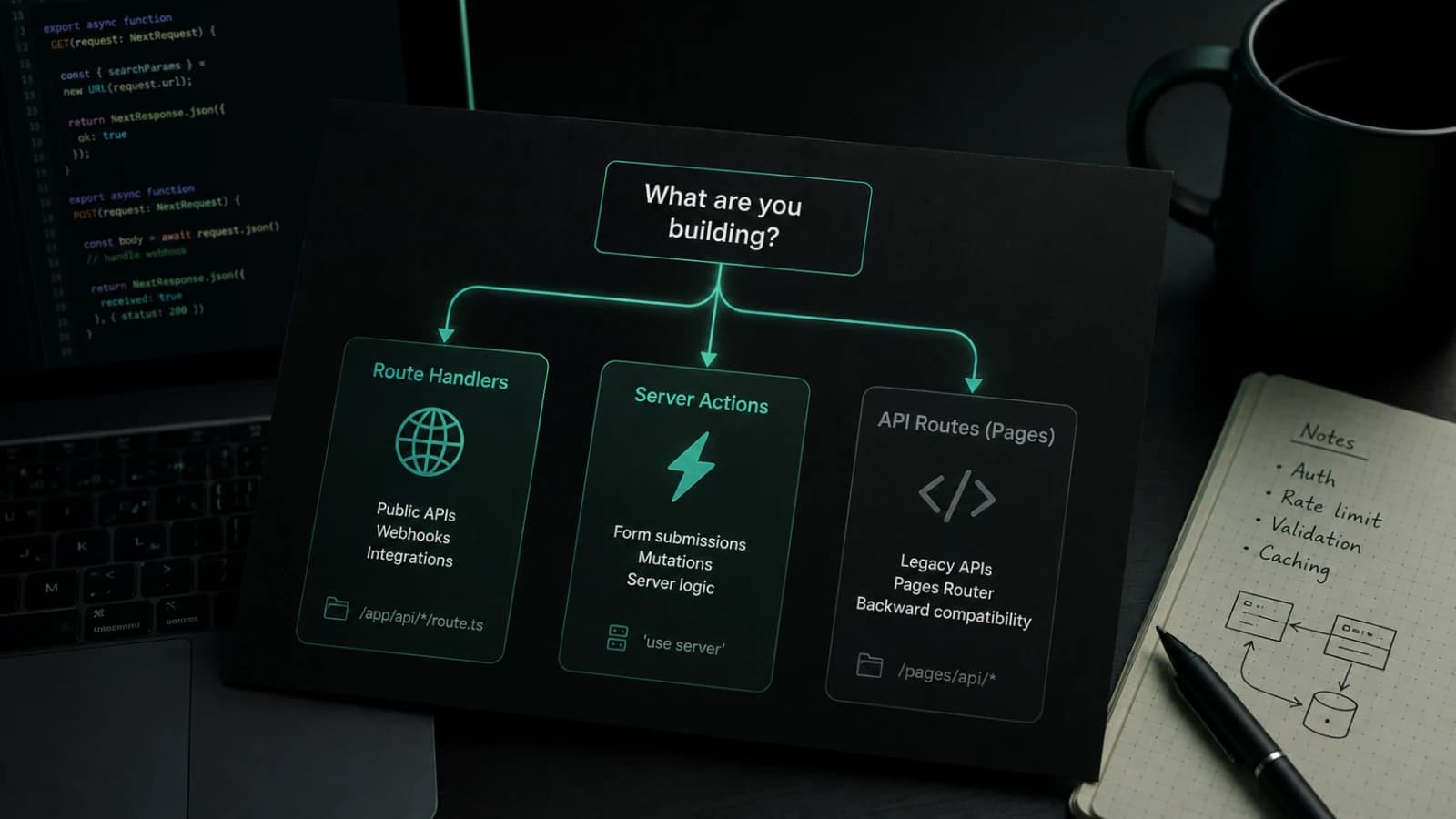
People still search for Next.js API Routes because the phrase is familiar.
For years, the answer was simple: put a file in pages/api, export a handler,
and call it from the client.
That mental model still exists if you are using the Pages Router.
But in a modern App Router project, the conversation changed. You now have
Server Components, Server Actions, Route Handlers, server-side fetch, cached
reads, revalidation, and a lot of small decisions that did not exist in older
Next.js apps.
So when someone asks:
Should I create an API route in Next.js?
The real answer is usually:
What kind of server boundary do you actually need?
That question matters more than the file name.
This article is how I think about API routes in Next.js in 2026. Not as a framework history lesson. Not as a documentation rewrite. Just the practical rules I use when building App Router projects that need forms, dashboards, webhooks, mobile clients, integrations, and real production behavior.
Quick answer
If you are using the Pages Router, API Routes live in pages/api.
If you are using the App Router, the closest equivalent is usually a
Route Handler inside the app directory:
app/api/users/route.tsUse Route Handlers when you need a real HTTP endpoint.
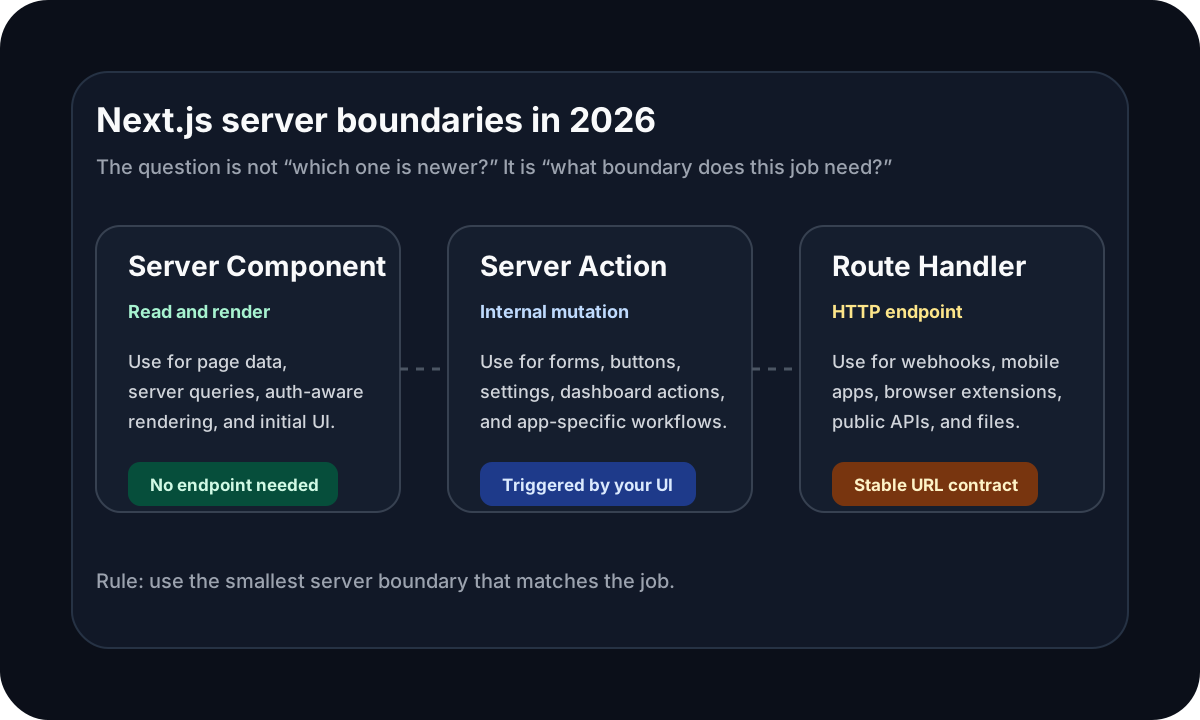
Use Server Actions when the server code belongs to your own app UI: forms, buttons, dashboard mutations, user settings, internal product workflows, and other actions triggered by your interface.
Use Server Components when you only need to read data and render a page.
That is the simple version.
The rest of the article is about the messy part: knowing which one fits the job when a real product starts growing.
API Routes are not gone
The first thing to clear up: API Routes are not gone.
If your project uses the Pages Router, pages/api is still a valid way to build
server-side endpoints inside a Next.js app.
A classic API Route looks like this:
// pages/api/hello.ts
import type { NextApiRequest, NextApiResponse } from 'next';

type ResponseData = {
  message: string;
};

export default function handler(
  req: NextApiRequest,
  res: NextApiResponse<ResponseData>
) {
  res.status(200).json({ message: 'Hello from Next.js' });
}
That model is easy to understand. A request comes in, a handler runs, a response goes out.
The confusion starts when the project uses the App Router.
In the App Router, you normally do not create pages/api routes. You create
Route Handlers with route.ts or route.js.
// app/api/hello/route.ts
import { NextResponse } from 'next/server';

export async function GET() {
  return NextResponse.json({ message: 'Hello from Next.js' });
}
The goal is similar: expose an HTTP endpoint.
The shape is different: Route Handlers use the Web Request and Response
model and live naturally inside the App Router.
So when people say “Next.js API Routes” in 2026, they may mean one of two things:
- the older
pages/apifeature from the Pages Router - the broader idea of creating server endpoints in Next.js, which usually means Route Handlers in the App Router
That is why search results and conversations often feel slightly mixed. Everyone is using the same phrase, but not always talking about the same file convention.
Route Handlers are the App Router version of API endpoints
For most new App Router projects, Route Handlers are the endpoint primitive.
A Route Handler is useful when you need a URL that can be requested directly:
POST /api/webhooks/stripe
GET  /api/public/products
POST /api/mobile/places
GET  /api/feed.xml
The important part is not that it sits under /api. The important part is that
it is a real HTTP interface.
That means another system, browser, client, service, or script can call it without knowing anything about your React component tree.
That is the main reason I reach for a Route Handler.
Not because it is “more backend”.
Because the thing I am building needs an endpoint.
Where Server Actions fit
Server Actions solve a different problem.
A Server Action is server code that can be called from your own app. It is very useful for product interactions that start inside your interface.
For example:
// app/settings/actions.ts
'use server';

export async function updateProfile(formData: FormData) {
  const name = String(formData.get('name') || '').trim();

  if (!name) {
    return { error: 'Name is required' };
  }

  // check auth
  // update database
  // revalidate UI

  return { success: true };
}
Then a form can use it directly:
<form action={updateProfile}>
  <input name="name" />
  <button type="submit">Save</button>
</form>
That is the part that feels different from older Next.js code.
In many older apps, I would create an API Route only because I needed a server
place to handle a form submission. The client would call /api/profile, the API
Route would validate the input, update the database, and return JSON.
In an App Router project, that API endpoint may not be necessary. If the action is only used by my own UI, a Server Action is often a cleaner fit.
That does not mean Server Actions replace every API route.
It means they replace a specific kind of API route: the internal endpoint that only existed to support one app-specific mutation.
The question I ask first
Before choosing between a Route Handler and a Server Action, I ask one question:
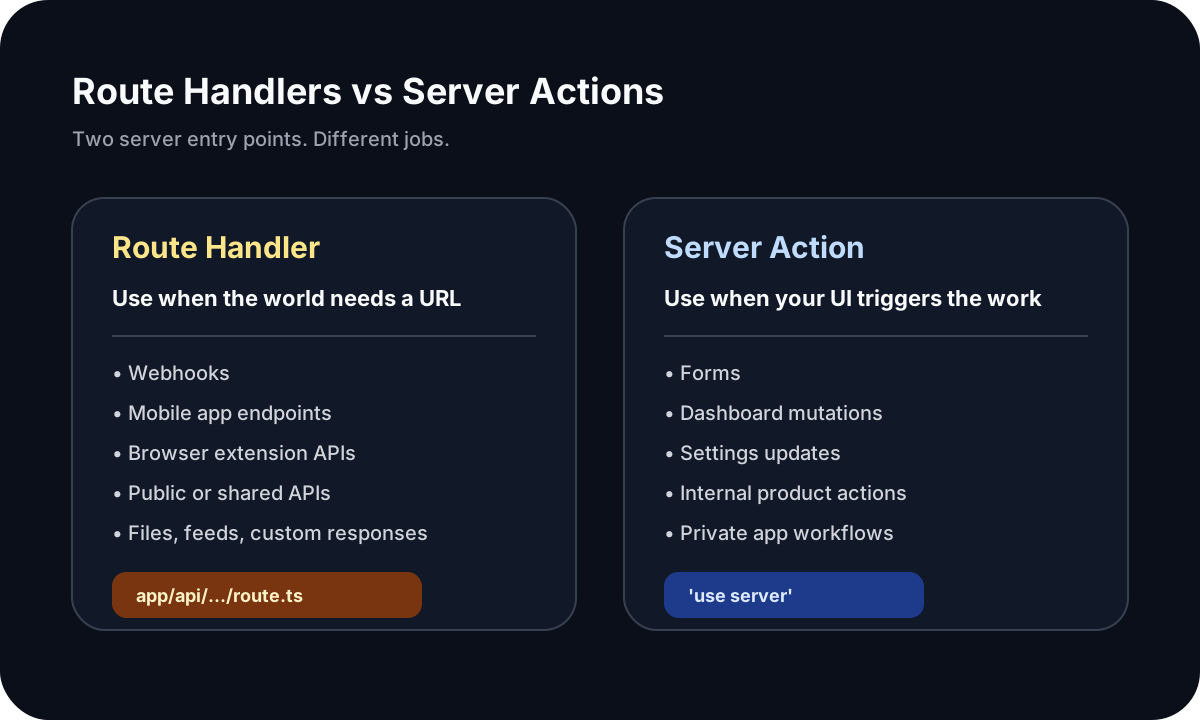
Does this need to be an HTTP endpoint, or is it just an app action?
That question removes a lot of noise.
If the answer is “this needs a stable URL that another client can call”, I use a Route Handler.
If the answer is “this happens inside my own Next.js interface”, I usually start with a Server Action.
If the answer is “I just need to read data for a page”, I probably do not need either one. I can fetch data in a Server Component or call a server-side query function directly.
The worst default is creating an API endpoint for everything just because that was the old habit.
It works, but it often adds boilerplate without adding clarity.
When I use a Route Handler
I use a Route Handler when the server code needs to behave like an API.
That usually means one of these cases.
1. Webhooks
Webhooks are the easiest example.
Stripe, Lemon Squeezy, GitHub, Clerk, Resend, and many other services need to call your application at a public URL.
That is not a Server Action job. The request is not coming from your form or button. It is coming from an external service.
POST /api/webhooks/stripeA Route Handler gives you the right shape for that:
// app/api/webhooks/stripe/route.ts
export async function POST(request: Request) {
  const body = await request.text();

  // verify signature
  // process event
  // return response

  return new Response('OK', { status: 200 });
}
You get the request body, headers, status codes, and response control you need.
2. External clients
If a mobile app, browser extension, another website, or external dashboard needs to call your backend, use a Route Handler.
For example, imagine a mobile app that saves places to the same database your Next.js web platform uses.
POST /api/mobile/placesThat is an API contract. It should not depend on a React form existing in the web app.
The mobile client needs a URL, a request shape, authentication, validation, and a clear response.
That is Route Handler territory.
3. Public or shared APIs
Sometimes you want to expose data intentionally.
GET /api/public/tools
GET /api/public/status
GET /api/integrations/projects
If other clients are supposed to call it, treat it like an API.
That means a Route Handler, not a Server Action.
4. Custom response formats
Route Handlers are also the right choice when the response is not a normal UI mutation result.
Examples:
- file downloads
- CSV exports
- RSS feeds
- XML
- text responses
- streamed responses
- custom cache headers
- redirects from an endpoint
- special status codes
A Server Action is not meant to be your general response formatting layer.
If you need to control the HTTP response, create an endpoint.
5. Integration boundaries
This is the most important product reason.
A Route Handler creates a boundary.
That boundary can be useful when different parts of a system need to talk to the same backend behavior.
For example:
- web app
- mobile app
- browser extension
- admin panel
- automation script
- third-party service
If all of them need the same operation, hiding that operation inside a Server Action tied to one UI is probably the wrong shape.
A shared service layer behind a Route Handler will usually age better.
When I use a Server Action
I use a Server Action when the action belongs to the app interface.
Examples:
- submit a contact form
- update profile settings
- create a dashboard item
- delete a saved record
- change a project status
- invite a team member
- save a preference
- mark a notification as read
- run a simple internal mutation from a button
Those are not public API problems.
They are product interaction problems.
A Server Action keeps that flow close to the UI without forcing me to create a
separate endpoint, write a client-side fetch, parse JSON, return custom status
codes, and manually connect all the pieces.
For many internal mutations, that is less code and a clearer mental model.
But there is one important warning.
A Server Action is not magic security dust.
It still runs on the server, and you still need to validate input, check auth, check ownership, handle errors, and avoid trusting the client. The fact that an action is called from your UI does not mean the input is safe.
I treat Server Actions as server entry points.
Small ones are fine. Careless ones are not.
When I use neither
A lot of Next.js code does not need a Route Handler or a Server Action.
This is easy to forget.
If a page needs to read data and render it, I usually start with a Server Component:
// app/projects/page.tsx
import { getProjectsForCurrentUser } from '@/features/projects/queries';

export default async function ProjectsPage() {
  const projects = await getProjectsForCurrentUser();

  return <ProjectsList projects={projects} />;
}
No /api/projects call.
No client-side loading state just for the first render.
No unnecessary endpoint.
The page is already running on the server, so it can call server-side code.
That is one of the biggest mindset shifts in App Router projects. You do not need to fetch from your own API every time you need data on a page.
If the code is already on the server, call the server function directly.
The mistake I see most often
The most common mistake is carrying the old SPA habit into the App Router.
The old habit looks like this:
React component -> fetch('/api/something') -> API route -> databaseThat was a reasonable pattern in many apps.
But in the App Router, it is not always the best default.
For a server-rendered page, this can often become:
Server Component -> server query -> databaseFor a form mutation, this can often become:
Form -> Server Action -> service -> databaseFor a real endpoint, it should still be:
External request -> Route Handler -> service -> databaseThe goal is not to avoid API routes at all costs.
The goal is to stop creating them when the app does not need an API boundary.
My practical decision table
This is the table I usually keep in my head.
| Scenario | What I usually use | Why |
|---|---|---|
| Render a dashboard page with user data | Server Component | The page is already on the server |
| Submit a settings form inside the app | Server Action | It is an internal mutation |
| Delete an item from an admin table | Server Action | It belongs to the UI workflow |
| Handle a Stripe webhook | Route Handler | External service needs an endpoint |
| Build an endpoint for a mobile app | Route Handler | External client needs a stable API |
| Return a CSV export | Route Handler | You need custom response behavior |
| Serve an RSS feed | Route Handler | It is a URL-based response |
| Update data from a browser extension | Route Handler | The extension is a separate client |
| Fetch data for a Server Component | Direct server function | No endpoint needed |
| Share business logic between several entry points | Service function | Keep the rules outside the transport layer |
The last row is the one that saves projects from becoming messy.
Server Actions and Route Handlers are entry points. They should not become the only place your business logic exists.
Keep business logic out of the transport layer
A Route Handler is a transport layer.
A Server Action is also an entry point.
Neither one should automatically become the home for all product logic.
For real projects, I prefer this shape:
app/
  api/
    projects/
      route.ts
  dashboard/
    projects/
      actions.ts
      page.tsx
features/
  projects/
    service.ts
    queries.ts
    validation.ts
Then the entry points stay small.
A Server Action can parse input, check the current user, call a service, and revalidate the right page.
A Route Handler can parse a request, verify auth or signatures, call the same service, and return a response.
The product rules live in the service layer.
That matters when the app grows.
At first, you may only have a dashboard button. Later, you may add a mobile app, browser extension, webhook, scheduled job, or public integration.
If the logic is trapped inside one Server Action, reuse becomes awkward. If the logic lives behind a service function, the entry point can change without rewriting the product rules.
Example: contact form
A contact form on your own site is usually a Server Action.
The user fills the form, clicks send, and your app sends an email or stores a lead.
You do not need a public API just for that.
<form action={sendContactMessage}>
  <input name="email" type="email" />
  <textarea name="message" />
  <button type="submit">Send message</button>
</form>
The action can validate input, rate-limit if needed, send the message, and return a result.
Would a Route Handler also work?
Yes.
But if nothing outside your own app needs that endpoint, the Route Handler is probably extra ceremony.
Example: Stripe webhook
A Stripe webhook is the opposite.
Stripe needs to send an HTTP request to your app. You need to read the raw payload, verify the signature, handle the event, and return a response.
That is not an app action.
That is an integration endpoint.
Use a Route Handler.
// app/api/webhooks/stripe/route.ts
export async function POST(request: Request) {
  const payload = await request.text();
  const signature = request.headers.get('stripe-signature');

  // verify event
  // update subscription state

  return new Response('OK');
}
The URL is part of the integration. The HTTP contract matters.
Example: dashboard mutation
Imagine an internal dashboard where a user changes the status of a project.
Draft -> Active -> ArchivedIf that mutation only happens inside your web app, I would usually start with a Server Action.
'use server';

export async function archiveProject(projectId: string) {
  // check auth
  // check project ownership
  // update database
  // revalidate dashboard
}
This keeps the mutation close to the product flow.
But if the same status change must also be available to a mobile app, an external integration, or an automation script, I would move the product rule into a shared service and expose a Route Handler for the external client.
The important thing is not the first file you create.
The important thing is whether the boundary still makes sense when the product gets another client.
Example: browser extension talking to a Next.js app
A browser extension is a separate client.
Even if the same person owns the extension and the web app, the extension still needs to call a URL.
So if a browser extension needs to save an audit, submit page data, fetch account limits, or generate a report, I would use a Route Handler.
POST /api/extension/audits
GET  /api/extension/account
That gives the extension a normal HTTP contract.
The route can verify a token, check the user, validate the payload, call a shared service, and return JSON.
Trying to model that as a Server Action would fight the shape of the problem.
Example: read-only data for a page
Now imagine a page that lists the current user's projects.
My first choice is not an API route.
It is a server query called from a Server Component.
export default async function ProjectsPage() {
  const projects = await getProjectsForCurrentUser();

  return <ProjectsView projects={projects} />;
}
The page is rendered on the server. The data is needed for that render. The client does not need to fetch it again just to make the architecture look like an older SPA.
This is one of the places where modern Next.js can feel simpler if you let it.
What about client-side fetching?
Client-side fetching still has a place.
I use it when the data is truly client-driven:
- search suggestions while typing
- infinite scrolling
- polling a temporary state
- loading optional panels after the page is interactive
- user-triggered filters that do not need to be part of the first render
In those cases, a Route Handler may be useful because the browser needs a URL to fetch.
But I try not to use client-side fetching as the default for everything.
If the page needs the data to render properly, and the server already knows the user and the context, server-side rendering is usually cleaner.
How I think about migration from pages/api
If I inherit an older Next.js project with many pages/api routes, I do not
rewrite everything immediately.
I first group the routes by purpose.
Keep endpoint-style routes as endpoints
Webhooks, public APIs, mobile endpoints, file responses, and integrations should stay as endpoints.
If the project is moving to the App Router, those can become Route Handlers over time.
Move app-only mutations to Server Actions
Some API routes only exist because a form needed somewhere to send a request.
Those are good candidates for Server Actions.
Not always. But often.
Move page reads into server queries
Some API routes exist because the client was fetching data that the server page could now load directly.
Those may not need a route at all anymore.
They may become plain server-side query functions.
Extract shared logic first
Before moving files around, I usually extract the real business logic into a service module.
Then the transport can change without changing the rule itself.
That makes migration less risky.
The hidden cost of unnecessary API routes
An API route is not bad.
But an unnecessary API route has a cost.
It adds another request. Another response shape. Another error format. Another place to validate input. Another place to check auth. Another place to keep in sync with the UI.
Sometimes that is worth it because the endpoint is a real boundary.
Sometimes it is just leftover architecture.
In small apps, that cost is easy to ignore.
In production apps, it shows up as confusion:
- the UI expects one error shape, the API returns another
- the same mutation exists in two places
- auth is checked differently across routes
- the database query is duplicated
- loading states exist only because the page avoided server rendering
- a simple form has more client code than product logic
That is what I try to avoid.
Not API routes.
Unnecessary boundaries.
The hidden risk of overusing Server Actions
There is also an opposite mistake.
Some teams discover Server Actions and try to use them for everything.
That gets messy too.
A Server Action is not a public API strategy. It is not a webhook endpoint. It is not the right interface for a mobile app. It is not a clean contract for a browser extension. It is not a general replacement for every HTTP route.
If another system needs to call your app, give it an endpoint.
If the response format matters, give it an endpoint.
If the operation is part of an integration boundary, give it an endpoint.
Server Actions are excellent when they fit the product flow. They are awkward when you force them to act like APIs.
The rule that keeps things simple
The rule I actually use is this:
Use the smallest server boundary that matches the job.
For rendering, that may be a Server Component.
For app mutations, that may be a Server Action.
For external access, that is usually a Route Handler.
For shared product rules, that should be a service function behind whichever entry point needs it.
This keeps the app understandable.
The UI does not need fake APIs for every action.
External clients do not need to depend on UI-specific Server Actions.
Business logic does not get trapped inside one route file.
And the codebase has a better chance of staying readable after the first version ships.
How this relates to Server Actions vs API Routes
I wrote a more focused breakdown of the decision in Server Actions vs API Routes in Next.js: the rules I actually use.
This article is the broader version.
If you are asking:
Should this mutation be a Server Action or an API route?
Read that one.
If you are asking:
How should I think about API routes in modern Next.js at all?
This is the mental model I would start with.
Final rules I use
Here are the rules I come back to in real projects.
Use Server Components for server-rendered reads.
Use Server Actions for private app mutations triggered by your own UI.
Use Route Handlers for HTTP endpoints, webhooks, external clients, custom responses, browser extensions, mobile apps, and integrations.
Keep business logic in service functions when it needs to be reused.
Do not create API routes just because older React apps did everything through
client-side fetch.
Do not use Server Actions as if they were public APIs.
And when the choice is unclear, ask the boring but useful question:
Is this an endpoint, an app action, or just server-rendered data?
Most Next.js architecture decisions get easier after that.
FAQ
Are API Routes still used in Next.js in 2026?
Yes. API Routes still exist in the Pages Router. In App Router projects, the
modern equivalent for endpoint-style server code is usually a Route Handler in
app/api/.../route.ts.
What replaced API Routes in the Next.js App Router?
For HTTP endpoints, Route Handlers are usually the App Router replacement for
API Routes. They let you define handlers like GET, POST, PUT, PATCH, and
DELETE inside a route.ts or route.js file.
Should I use Server Actions or Route Handlers?
Use Server Actions for app-specific mutations triggered by your UI. Use Route Handlers when you need an endpoint that can be called by external services, mobile apps, browser extensions, webhooks, or client-side fetch requests.
Can Server Actions replace API Routes?
Server Actions can replace some internal API routes that only existed for forms or dashboard mutations. They should not replace webhooks, public APIs, mobile endpoints, custom response routes, or integration endpoints.
Where do API routes go in the Next.js App Router?
In the App Router, endpoint-style routes usually go in the app directory with a
route.ts file. For example, app/api/users/route.ts can define a GET or
POST handler.
Should I fetch from my own API inside a Server Component?
Usually no. If the code is already running on the server, it is often cleaner to call a server-side query function directly. Fetching from your own API is more useful when the browser or another external client needs that endpoint.
Are Route Handlers only for APIs?
No. Route Handlers are useful for any custom HTTP response: JSON APIs, webhooks, RSS feeds, file downloads, redirects, XML, plain text, streams, and other URL-based responses.
Can a mobile app call a Server Action?
I would not design a mobile API around Server Actions. A mobile app should call a clear HTTP endpoint, which usually means a Route Handler. That gives you a stable contract, explicit auth, validation, and response formats.
Are Server Actions secure?
Server Actions run on the server, but you still need to treat them like server entry points. Always validate input, check authentication, check authorization, and avoid trusting values from the client.
What is the best default for a new Next.js App Router project?
A good default is: Server Components for reads, Server Actions for internal mutations, Route Handlers for endpoints, and shared service functions for business logic. That keeps the architecture flexible without adding unnecessary API boilerplate.
Related guides
- Next.js App Router Architecture in 2026: How I Structure Production Apps
- Server Actions vs API Routes in Next.js: the rules I actually use
- Server vs Client Components in Next.js: the rules I actually use
- What Actually Makes a Frontend Feel Fast
If you are building a custom Next.js app and the architecture is starting to feel unclear, I can help shape the first version, clean up the structure, or build the product with a production-ready foundation.
Discussion
Responses
No approved responses yet.