
Next.js gives you more than one way to run code on the server.
That is useful.
It is also confusing.
In older Next.js projects, the answer was usually simple: create an API Route, call it from the client, and handle the request on the server. In App Router projects, the decision is not always that obvious anymore.
You can use Server Components. You can use Server Actions. You can use Route Handlers. If you still have a Pages Router setup, you may also have API Routes.
The question is not:
Which one is newer?
The better question is:
Which one fits the job?
This article is the practical version of that decision. Not a full documentation rewrite. Not a framework debate. Just the rules I actually use when deciding between Server Actions and API Routes in real Next.js projects.
First: API Routes and Route Handlers are not exactly the same thing
Before comparing anything, it is important to clarify the naming.
In the Pages Router, Next.js has API Routes inside pages/api.
In the App Router, the equivalent concept is usually Route Handlers inside the app directory using route.ts or route.js.
So when people say:
Should I use Server Actions or API Routes in App Router?
They often really mean:
Should I use Server Actions or Route Handlers?
That distinction matters.
If you are building a modern App Router project, you usually compare:
- Server Actions
- Route Handlers
- Server Components
If you are maintaining an older Pages Router project, you may still compare:
- API Routes
- client-side fetch calls
- server-side rendering functions
In this article, I will use “API Routes” in the common broad sense, but technically, for App Router, the server endpoint option is usually a Route Handler.
The simple rule
Here is the shortest version:
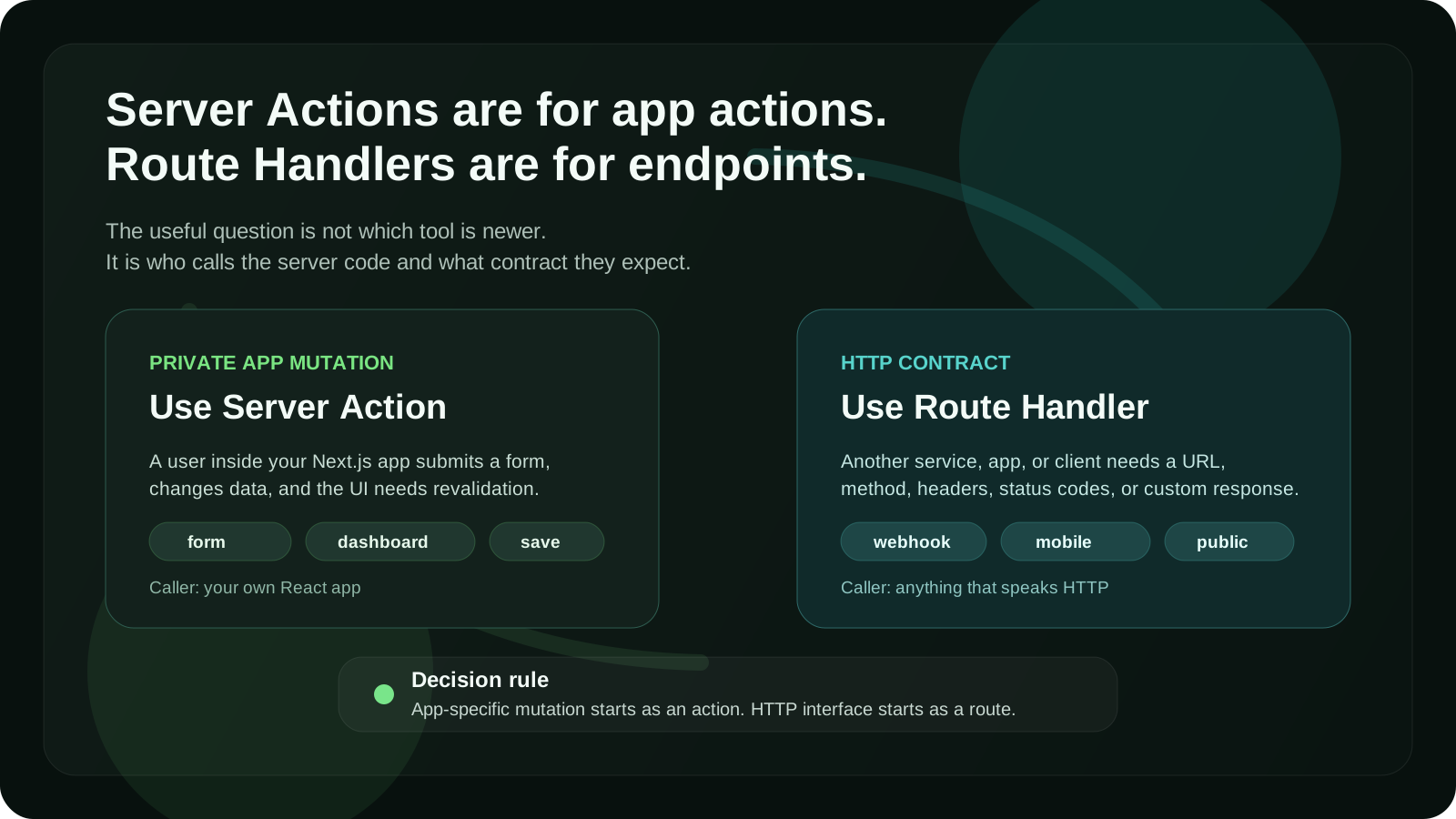
Use Server Actions for app-specific mutations.
Use Route Handlers or API Routes for HTTP endpoints.
That one rule solves most decisions.
A Server Action is great when a user does something inside your app and you need to change data on the server.
Examples:
- submitting a form
- creating a post
- updating a profile
- deleting a saved item
- saving user preferences
- triggering a database mutation
- revalidating app data after a change
A Route Handler or API Route is better when you need a real HTTP endpoint.
Examples:
- receiving a webhook
- exposing data to another app
- handling requests from a mobile app
- building a public API
- proxying a third-party service
- supporting non-React clients
- returning custom JSON, files, feeds, or streaming responses
That is the main split.
One is about app actions.
The other is about HTTP interfaces.
What Server Actions are good at
Server Actions are server functions that can be called from your Next.js application.
The most obvious use case is a form.
Instead of creating a client-side submit handler, calling /api/something, parsing JSON, and then updating the UI, you can send the form directly to a server function.
Example:
// app/settings/actions.ts
'use server'

import { revalidatePath } from 'next/cache'
import { z } from 'zod'

const schema = z.object({
  displayName: z.string().min(2).max(80),
})

export async function updateProfile(formData: FormData) {
  const result = schema.safeParse({
    displayName: formData.get('displayName'),
  })

  if (!result.success) {
    return {
      ok: false,
      message: 'Please enter a valid display name.',
    }
  }

  // Check auth here
  // Update database here

  revalidatePath('/settings')

  return {
    ok: true,
    message: 'Profile updated.',
  }
}
Then you can use it from a form:
// app/settings/page.tsx
import { updateProfile } from './actions'

export default function SettingsPage() {
  return (
    <form action={updateProfile}>
      <input name="displayName" />
      <button type="submit">Save</button>
    </form>
  )
}
That is the kind of code Server Actions are designed for.
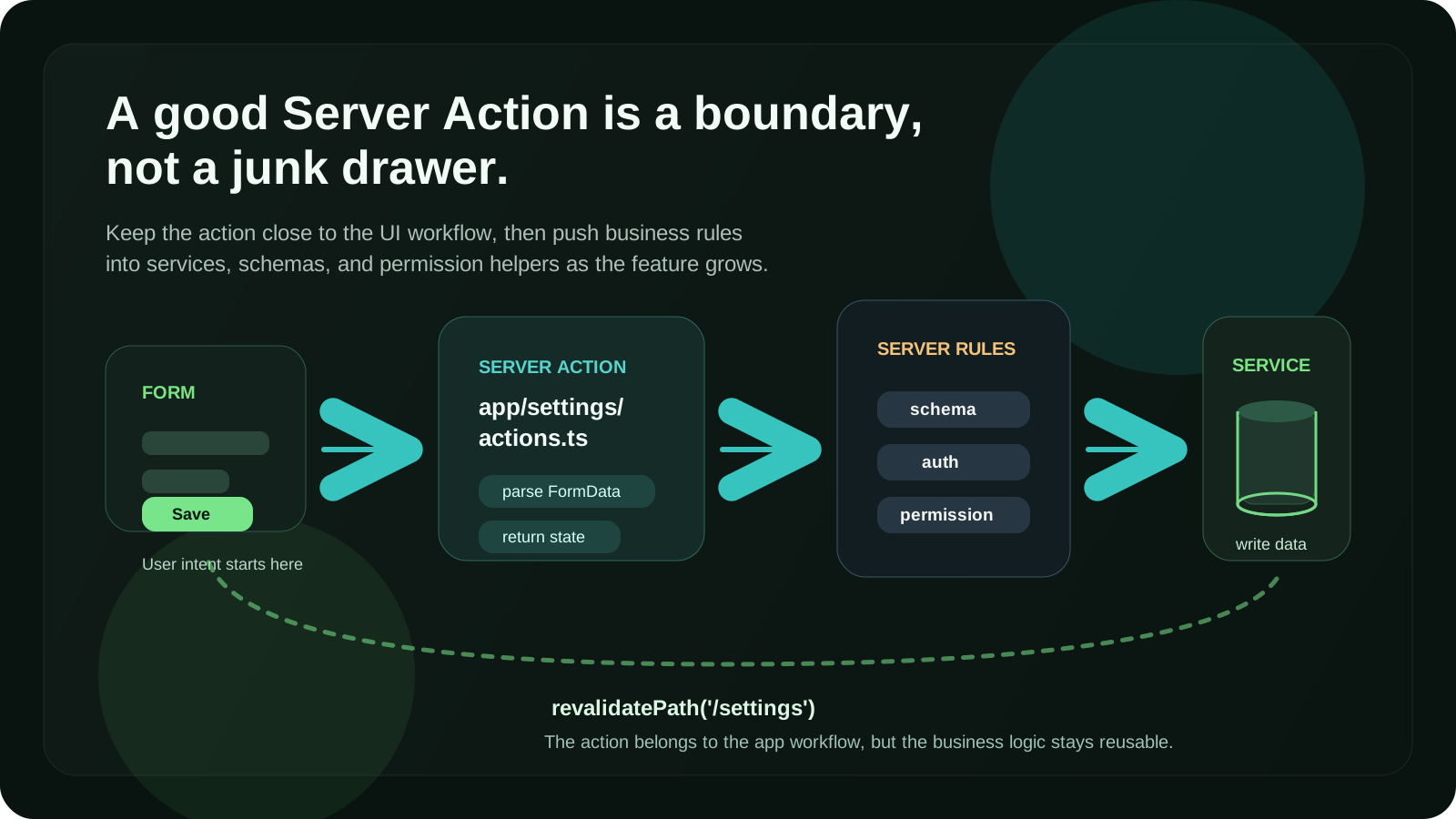
The user performs an action. The server changes something. The page can revalidate. The workflow stays close to the component that needs it.
What API Routes and Route Handlers are good at
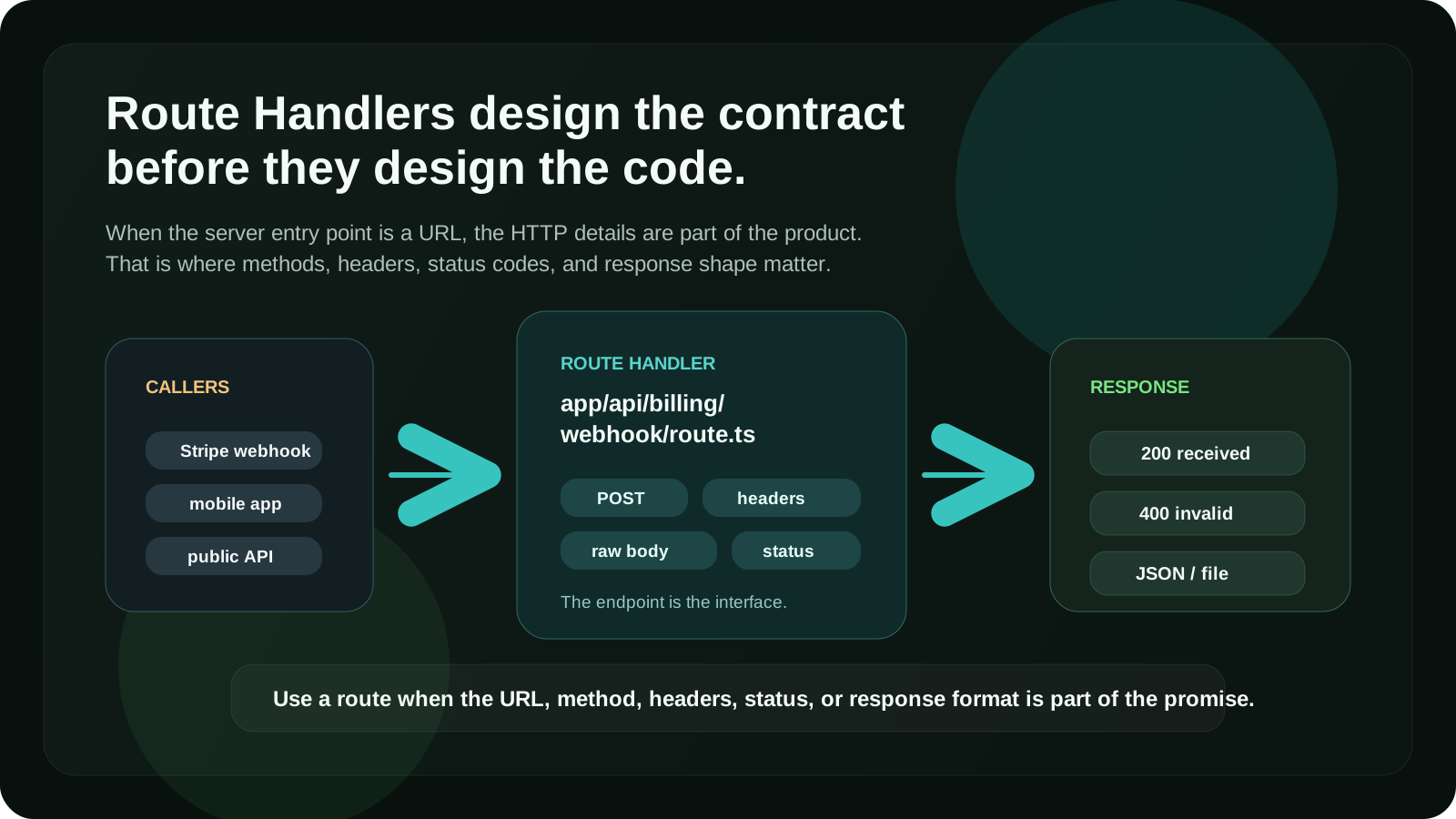
API Routes and Route Handlers are better when the main thing you are designing is an HTTP contract.
For example, a Stripe webhook should not be a Server Action.
It is not called by your React component. It is called by Stripe. It needs a stable URL, a request body, headers, verification, status codes, and a response.
That belongs in a Route Handler.
Example:
// app/api/stripe/webhook/route.ts
import { NextResponse } from 'next/server'

export async function POST(request: Request) {
  const body = await request.text()
  const signature = request.headers.get('stripe-signature')

  if (!signature) {
    return NextResponse.json({ error: 'Missing signature' }, { status: 400 })
  }

  // Verify webhook signature here
  // Handle event here

  return NextResponse.json({ received: true })
}
This is not really an “app action”.
It is an endpoint.
That is where Route Handlers make more sense.
My decision table
Here is the decision table I use most often.
| Situation | Use Server Action | Use Route Handler / API Route |
|---|---|---|
| Form inside your Next.js app | Yes | Sometimes |
| Create, update, or delete app data | Yes | Sometimes |
| Needs to be called by another service | No | Yes |
| Webhook | No | Yes |
| Public API | No | Yes |
| Mobile app or external client needs access | No | Yes |
| Needs custom HTTP status codes and headers | Sometimes | Yes |
| File upload with custom handling | Sometimes | Yes |
| Simple internal mutation | Yes | No |
| Data fetch for rendering UI | Usually no | Sometimes |
| Third-party callback URL | No | Yes |
| Shared backend endpoint | No | Yes |
The most important question is:
Who is calling this code?
If the caller is your own React app, a Server Action may be the cleanest option.
If the caller is anything else, use a Route Handler or API Route.
Rule 1: Use Server Actions for forms
Forms are the clearest Server Actions use case.
A form already represents an action:
- create account
- update settings
- save item
- delete record
- send message
- join waitlist
- submit feedback
In the old pattern, you might write something like this:
async function onSubmit(values) {
  await fetch('/api/profile', {
    method: 'POST',
    body: JSON.stringify(values),
  })
}
Then you create the API endpoint:
export default async function handler(req, res) {
  // parse request
  // validate data
  // check auth
  // update database
  // return JSON
}
That works.
But for many app forms, it adds ceremony.
With Server Actions, the mutation can live closer to the UI flow.
That does not mean all form logic belongs inside the component. I usually keep actions in a separate actions.ts file when the logic is reused or non-trivial.
Example structure:
app/
  settings/
    page.tsx
    actions.ts
    schema.ts
That gives you a simple mental model:
page.tsxrenders the UIschema.tsvalidates the inputactions.tsperforms the mutation
Clean enough for small features.
Structured enough for real projects.
Rule 2: Use Route Handlers for webhooks
Webhooks should almost always be Route Handlers.
A webhook is an external HTTP request. It usually needs:
- raw request body
- signature verification
- specific status codes
- provider-specific headers
- retry-safe behavior
- logging
- idempotency
That is endpoint territory.
Do not force webhooks into Server Actions.
Good examples for Route Handlers:
- Stripe webhook
- Lemon Squeezy webhook
- GitHub webhook
- Clerk webhook
- Supabase webhook
- Resend inbound email webhook
- custom integration callback
A webhook needs a URL that another system can call.
That is not what Server Actions are for.
Rule 3: Use Server Actions for private app mutations
Most product apps have many small private mutations.
For example:
- save a place
- rename a collection
- archive a project
- update a task status
- mark a notification as read
- change a workspace setting
- invite a teammate from the dashboard
These actions are usually not part of a public API.
They are not used by a mobile app.
They are not called by an external service.
They only exist because the current web app needs them.
That is where Server Actions feel natural.
You can still keep the logic clean by separating the layers:
app/
  dashboard/
    actions.ts
features/
  projects/
    service.ts
    schema.ts
    permissions.ts
The Server Action should not become a giant file full of business logic.
I like this pattern:
'use server'

import { createProject } from '@/features/projects/service'
import { createProjectSchema } from '@/features/projects/schema'

export async function createProjectAction(formData: FormData) {
  const parsed = createProjectSchema.safeParse({
    name: formData.get('name'),
  })

  if (!parsed.success) {
    return { ok: false, message: 'Invalid project name.' }
  }

  return createProject(parsed.data)
}
The action handles the app boundary.
The service handles the business operation.
That separation matters as the project grows.
Rule 4: Use Route Handlers when you need an API contract
Sometimes you need an endpoint even if the current caller is your own frontend.
That happens when the endpoint has a meaningful HTTP contract.
Use a Route Handler when you care about:
- request method
- URL shape
- status code
- response format
- headers
- caching behavior
- streaming
- external reuse
- non-React clients
Example:
// app/api/reports/route.ts
import { NextResponse } from 'next/server'

export async function GET() {
  const reports = await getReports()

  return NextResponse.json({ reports })
}
This endpoint can be called from different places.
It has a clear URL.
It returns JSON.
That is an API.
A Server Action would make the code feel too tied to a single UI workflow.
Rule 5: Do not use Server Actions as a general API layer
This is one of the easiest mistakes to make.
Server Actions are convenient, so people start using them for everything.
That can make the app feel clean at first.
But then problems appear.
For example:
- another client needs the same mutation
- an integration needs a public endpoint
- you need custom status codes
- you need request-level middleware behavior
- you want to document the API
- you want to test it as an HTTP endpoint
- you need stable URLs across clients
If your server code is really an API, make it an API.
Do not hide it behind Server Actions just because the first caller is a React component.
A good question to ask:
Would this still make sense if I had a mobile app tomorrow?
If yes, a Route Handler may be the safer long-term choice.
Rule 6: Do not create API endpoints just to avoid Server Actions
The opposite mistake is also common.
Some teams keep creating API endpoints for every tiny mutation because that is how they wrote Next.js before App Router.
That can lead to unnecessary boilerplate:
- client submit handler
- fetch call
- JSON parsing
- API route
- duplicated validation
- manual loading states
- manual revalidation
For many internal app mutations, that is more code than you need.
If the action belongs to one app workflow and does not need to be exposed as an HTTP API, Server Actions are often simpler.
Less ceremony is a valid technical reason.
Rule 7: Validation belongs on the server either way
This rule is not about Server Actions vs API Routes.
It applies to both.
Client-side validation is useful for user experience.
Server-side validation is required for correctness.
Never trust the browser.
Whether the data arrives through a Server Action or a Route Handler, validate it on the server before writing to the database.
A common pattern:
import { z } from 'zod'

export const createTaskSchema = z.object({
  title: z.string().min(1).max(120),
})
Then reuse that schema in the boundary that receives the input.
For a Server Action:
const parsed = createTaskSchema.safeParse({
  title: formData.get('title'),
})
For a Route Handler:
const body = await request.json()
const parsed = createTaskSchema.safeParse(body)
Same rule.
Different boundary.
Rule 8: Auth also belongs on the server
Do not rely on the client to decide whether a user is allowed to perform an action.
A hidden button is not security.
A disabled form is not security.
A protected page is not always enough.
Every sensitive mutation should check authorization on the server.
For Server Actions, check auth inside the action or inside the service it calls.
For Route Handlers, check auth inside the handler or middleware, depending on the app.
Example:
export async function deleteProjectAction(formData: FormData) {
  const user = await getCurrentUser()

  if (!user) {
    return { ok: false, message: 'You must be signed in.' }
  }

  const projectId = String(formData.get('projectId'))

  const canDelete = await userCanDeleteProject(user.id, projectId)

  if (!canDelete) {
    return { ok: false, message: 'You do not have access to this project.' }
  }

  await deleteProject(projectId)

  return { ok: true }
}
The important part is not the exact auth library.
The important part is that the permission check happens on the server boundary.
Rule 9: Keep data fetching separate from mutations
Server Actions are mainly for mutations.
That means actions like:
- create
- update
- delete
- submit
- save
- archive
- invite
- reorder
For reading data, I usually start with Server Components and direct server-side data fetching.
Example:
export default async function ProjectsPage() {
  const projects = await getProjects()

  return <ProjectList projects={projects} />
}
You do not need a Server Action just to read data for initial rendering.
You also do not always need a Route Handler.
If the data is only used to render the page on the server, fetch it on the server.
Use Route Handlers for reads when you need an endpoint.
Use client-side fetching when the data changes after interaction or needs to load independently in the browser.
Use Server Actions mostly when the user is changing something.
Rule 10: Think about revalidation before choosing
In App Router, data updates are not just about writing to the database.
You also need to think about what should update after the mutation.
Server Actions work nicely with revalidation.
For example:
import { revalidatePath } from 'next/cache'

export async function createPostAction(formData: FormData) {
  // create post

  revalidatePath('/posts')

  return { ok: true }
}
That is a good fit when the mutation belongs to a page or section of the app.
Route Handlers can also trigger revalidation, but the workflow can feel more detached from the UI.
So I ask:
Does this mutation mostly exist to update this app interface?
If yes, Server Action.
Does this mutation mostly exist as an HTTP endpoint?
If yes, Route Handler.
Rule 11: Be careful with reusable actions
Server Actions can be reused, but I try not to treat them like a random utility library.
This is fine:
app/
  dashboard/
    actions.ts
This can become messy:
lib/
  actions.ts
A giant global actions.ts file usually becomes a junk drawer.
Better options:
features/
  billing/
    actions.ts
    service.ts
    schema.ts

features/
  teams/
    actions.ts
    service.ts
    schema.ts
Or, for route-specific actions:
app/
  settings/
    actions.ts
The goal is not to follow one perfect folder structure.
The goal is to keep actions near the product feature they belong to.
Rule 12: Use Route Handlers for third-party API proxying
Sometimes the browser should not call a third-party API directly.
Maybe you need to hide a secret key.
Maybe you need to normalize the response.
Maybe the third-party API has CORS limitations.
Maybe you want to rate-limit or log requests.
In those cases, a Route Handler often makes more sense than a Server Action.
Example:
// app/api/search/route.ts
import { NextResponse } from 'next/server'

export async function GET(request: Request) {
  const { searchParams } = new URL(request.url)
  const query = searchParams.get('q')

  if (!query) {
    return NextResponse.json({ error: 'Missing query' }, { status: 400 })
  }

  const results = await searchExternalService(query)

  return NextResponse.json({ results })
}
This behaves like a normal API endpoint.
It can be called by search UI, background jobs, tests, or another client later.
That flexibility is useful.
Rule 13: Use Server Actions when progressive enhancement matters
One underrated benefit of Server Actions is that they fit naturally with HTML forms.
That means you can often build flows that are less JavaScript-heavy.
The user submits a form.
The server handles it.
The app responds.
For many product forms, this is a simpler model than managing everything through client-side event handlers.
This does not mean you never need client-side code.
You still may need:
- optimistic UI
- pending states
- inline validation feedback
- dynamic inputs
- modals
- autocomplete
- drag and drop
But the mutation itself can still live on the server.
The best setup is often a combination:
- Client Component for interactivity
- Server Action for the mutation
- shared schema for validation
- server-side auth check
- revalidation after success
That gives you both good UX and a clean server boundary.
Rule 14: Use Route Handlers for files, feeds, and custom responses
Server Actions are not the right tool for every server-side task.
If you are returning something that is not a normal app mutation result, use a Route Handler.
Good examples:
sitemap.xmlrobots.txt- RSS feed
- CSV export
- PDF generation endpoint
- file download
- image proxy
- Open Graph image route
- streaming response
- custom JSON API
These are response-oriented tasks.
They need an HTTP response.
Route Handlers are built for that.
Rule 15: Do not ignore testing
Testing can influence the decision too.
Server Actions are easy to test as functions if the logic is separated well.
Route Handlers are easy to test as HTTP boundaries if the endpoint contract matters.
That is another reason I prefer separating business logic into services.
Instead of testing only this:
export async function createProjectAction(formData: FormData) {
  // everything happens here
}
I prefer this:
export async function createProject(input: CreateProjectInput) {
  // business logic here
}
Then the Server Action becomes a thin wrapper:
export async function createProjectAction(formData: FormData) {
  // parse input
  // check auth
  // call createProject
}
The same service can also be used by a Route Handler later if needed.
That keeps your architecture flexible.
A practical example: creating a project
Let’s say you are building a dashboard and users can create projects.
The project creation flow is only used inside your web app.
It does not need to be public.
It does not need a mobile client.
It is a normal form mutation.
I would use a Server Action.
<form action={createProjectAction}>
  <input name="name" placeholder="Project name" />
  <button type="submit">Create project</button>
</form>
Then in the action:
'use server'

import { revalidatePath } from 'next/cache'
import { createProjectSchema } from './schema'
import { createProject } from '@/features/projects/service'

export async function createProjectAction(formData: FormData) {
  const parsed = createProjectSchema.safeParse({
    name: formData.get('name'),
  })

  if (!parsed.success) {
    return { ok: false, message: 'Invalid project name.' }
  }

  await createProject(parsed.data)
  revalidatePath('/dashboard/projects')

  return { ok: true }
}
This is a good Server Action use case.
The action is private to the app.
The form is simple.
The mutation updates app data.
Revalidation is close to the workflow.
A practical example: receiving a webhook
Now let’s say Stripe needs to tell your app that a subscription was updated.
That is not a Server Action.
Stripe does not submit your React form.
Stripe calls an endpoint.
I would use a Route Handler.
// app/api/billing/webhook/route.ts
import { NextResponse } from 'next/server'

export async function POST(request: Request) {
  const body = await request.text()
  const signature = request.headers.get('stripe-signature')

  if (!signature) {
    return NextResponse.json({ error: 'Missing signature' }, { status: 400 })
  }

  // verify signature
  // update subscription state

  return NextResponse.json({ ok: true })
}
This needs an HTTP boundary.
The URL matters.
The method matters.
The headers matter.
The status code matters.
Route Handler is the right tool.
A practical example: saving a user preference
Now imagine a user toggles a setting in your app.
For example:
- dark mode preference
- compact layout preference
- email notification setting
- default workspace
If that setting is only used inside your web app, I would usually use a Server Action.
'use server'

export async function updateNotificationSettings(formData: FormData) {
  const user = await getCurrentUser()

  if (!user) {
    return { ok: false, message: 'Unauthorized' }
  }

  const enabled = formData.get('enabled') === 'on'

  await saveNotificationSettings(user.id, { enabled })

  return { ok: true }
}
This is not a public API.
It is a private app mutation.
Server Action fits.
A practical example: building a public endpoint
Now imagine users can fetch public project data from your app.
Example:
GET /api/public/projects/acmeThat should be a Route Handler.
// app/api/public/projects/[slug]/route.ts
import { NextResponse } from 'next/server'

export async function GET(
  request: Request,
  { params }: { params: Promise<{ slug: string }> }
) {
  const { slug } = await params
  const project = await getPublicProject(slug)

  if (!project) {
    return NextResponse.json({ error: 'Not found' }, { status: 404 })
  }

  return NextResponse.json({ project })
}
This endpoint has a public contract.
Someone may bookmark it, call it from another app, or integrate with it.
That is not a Server Action job.
The mistake I try to avoid
The biggest mistake is choosing based on fashion.
Server Actions are not automatically better because they are newer.
API Routes are not automatically worse because they are older.
Route Handlers are not automatically necessary just because the code runs on the server.
The right decision depends on the boundary.
Ask these questions:
- Is this triggered by a form or app interaction?
- Is this only used inside this Next.js app?
- Does it need a stable URL?
- Will another client call it?
- Do I need custom status codes or headers?
- Is this a webhook?
- Is this a public API?
- Is this mostly a mutation or an HTTP endpoint?
Those questions are more useful than arguing about which feature is “the Next.js way”.
My default architecture
In most App Router projects, my default setup looks like this:
app/
  dashboard/
    page.tsx
    actions.ts
  api/
    webhooks/
      stripe/
        route.ts

features/
  projects/
    service.ts
    schema.ts
    permissions.ts
The responsibilities are clear:
- Server Components render server data
- Server Actions handle private app mutations
- Route Handlers handle HTTP endpoints
- services contain reusable business logic
- schemas validate input
- permission helpers keep authorization explicit
This structure keeps the app simple without locking everything into one pattern.
So, should you use Server Actions or API Routes?
Use Server Actions when:
- the action belongs to your web app UI
- the main task is a mutation
- the caller is your own React app
- you are handling a form submission
- you want less client-side boilerplate
- you want to revalidate app data after a change
- the logic does not need to be a public endpoint
Use Route Handlers or API Routes when:
- you need a real HTTP endpoint
- another service needs to call your app
- you are handling a webhook
- you are building a public or shared API
- a mobile app or external client needs access
- you need custom headers, status codes, or response formats
- you are returning files, feeds, streams, or custom JSON
That is the practical difference.
Server Actions are for actions inside the app.
Route Handlers and API Routes are for endpoints.
Final thoughts
The Server Actions vs API Routes debate becomes easier when you stop treating it like a winner-takes-all decision.
They solve different problems.
Server Actions are great for private mutations inside your Next.js app. They reduce boilerplate, work naturally with forms, and keep many product workflows simple.
Route Handlers and API Routes are better when you need an HTTP interface. They are the right choice for webhooks, public APIs, external clients, custom responses, and integration boundaries.
The rule I actually use is simple:
If it is an app-specific mutation, start with a Server Action.
If it is an HTTP endpoint, use a Route Handler or API Route.
That rule is not perfect, but it is a good default.
And good defaults are what keep Next.js projects from turning into architecture soup.
FAQ
Are Server Actions better than API Routes in Next.js?
Not always. Server Actions are better for private app mutations, especially forms and simple data changes inside a Next.js App Router project. API Routes or Route Handlers are better when you need an HTTP endpoint, webhook, public API, custom response, or external client support.
Should I use Server Actions or Route Handlers in Next.js App Router?
Use Server Actions when the code is triggered by your app UI and mainly changes data. Use Route Handlers when you need a URL that can receive HTTP requests from browsers, third-party services, mobile apps, webhooks, or other external clients.
Are API Routes still used in Next.js App Router?
In App Router, the equivalent of API Routes is usually Route Handlers inside the app directory. API Routes still exist in the Pages Router, but App Router projects usually use Route Handlers for endpoint-style server code.
When should I use Server Actions in Next.js?
Use Server Actions for form submissions, private mutations, dashboard actions, user settings, create/update/delete workflows, and cases where the mutation belongs directly to your Next.js app interface.
When should I use API Routes or Route Handlers?
Use API Routes or Route Handlers for webhooks, public APIs, third-party callbacks, custom JSON endpoints, file downloads, RSS feeds, mobile app endpoints, and any server code that needs a stable HTTP contract.
Can Server Actions replace API Routes?
Server Actions can replace some internal API routes that were only created for app-specific mutations. They should not replace real API endpoints, webhooks, public APIs, or routes that need to be called by external clients.
Do Server Actions run on the server?
Yes. Server Actions run on the server. That is why they are useful for database writes, secure mutations, validation, authorization checks, and revalidation. But you still need to validate input and check permissions on the server.
Should I put business logic inside Server Actions?
Small logic can live in a Server Action, but for real projects it is usually better to keep business logic in separate service files. The Server Action should parse input, check auth, call the service, and revalidate data when needed.
Are Server Actions good for SEO?
Server Actions themselves do not directly improve SEO. They can help product architecture by simplifying server-side mutations. SEO still depends on rendering, metadata, content quality, performance, internal linking, structured data, and crawlable pages.
What is the best default for a new Next.js App Router project?
A good default is to use Server Components for server-rendered data, Server Actions for private app mutations, and Route Handlers for HTTP endpoints. This keeps the architecture simple and avoids unnecessary API boilerplate.
Related guides:
Discussion
Responses
No approved responses yet.