A user tells you that the AI agent gave the wrong answer.
You open the conversation and read the final message. It sounds confident. It is clearly wrong. You try the same prompt yourself, but this time the answer is correct.
Now what?
Maybe the agent retrieved an old document. Maybe a tool timed out and returned an empty result. Maybe it called the right tool with the wrong customer ID. Maybe a retry performed the same action twice. Maybe a guardrail removed the only useful part of the context. Maybe the model did everything correctly and the source data itself was wrong.
The final answer cannot tell you which one happened.
That is the reason observability matters for AI agents. Not because every team needs another dashboard, but because an agent is a chain of decisions and side effects. If I can see only the last message, I can see the symptom. I cannot see the run.
For me, AI agent observability means being able to answer a simple question:
What exactly happened between the user's request and the result they saw?
A normal error log is no longer enough
In a traditional API, the path is usually fairly predictable.
A request reaches an endpoint. The application validates it, queries a service or database, and returns a response. When something fails, a stack trace, request ID, status code, and a few structured fields often take you close to the cause.
An agent run is less tidy.
One user request may trigger several model calls, two searches, a retrieval step, three tool calls, a permission check, a handoff to another agent, a retry, and one final model response. Some steps run in parallel. Some happen only when the model decides they are needed. The exact path may change even when the user asks the same question again.
Nothing has technically crashed, yet the result may still be bad.
That is the uncomfortable part. Many important AI failures are successful HTTP requests.
The server returns 200. The model returns text. The interface renders it.
Every infrastructure graph is green.
The product is still wrong.
Logs, metrics, and traces answer different questions
These terms are often grouped together, but I use them for different jobs.
Logs tell me what happened at one moment
A log is a structured fact about an event.
For example:
{
  "runId": "run_8f21",
  "event": "tool_call_failed",
  "tool": "check_refund_eligibility",
  "errorType": "timeout",
  "durationMs": 5000
}
That is useful. I can search it, count it, and attach an alert to it.
But one log line does not explain how the failure affected everything that came after it.
Metrics tell me whether a pattern is changing
A metric turns many events into a trend.
Tool timeout rate went from 0.8% to 4.2%. P95 latency increased by six seconds. Average tool calls per run doubled after a prompt change. Users now reject 18% of proposed actions instead of 6%.
Metrics tell me that something moved. They are good for alerts, releases, and capacity decisions.
They rarely explain one strange conversation.
Traces tell me the story of one run
A trace connects the steps in the order they happened.
It shows the initial request, the context selected for the model, each model call, each tool call, the result of that tool, any retry or handoff, the guardrails that ran, and the final outcome.
The official OpenAI tracing documentation uses the same basic structure: a session contains turns, a turn contains steps, and each recorded step is a span with timing, status, inputs, and outputs where available.
The vendor does not matter much to the mental model. A useful trace is simply a connected record of how one result came to exist.
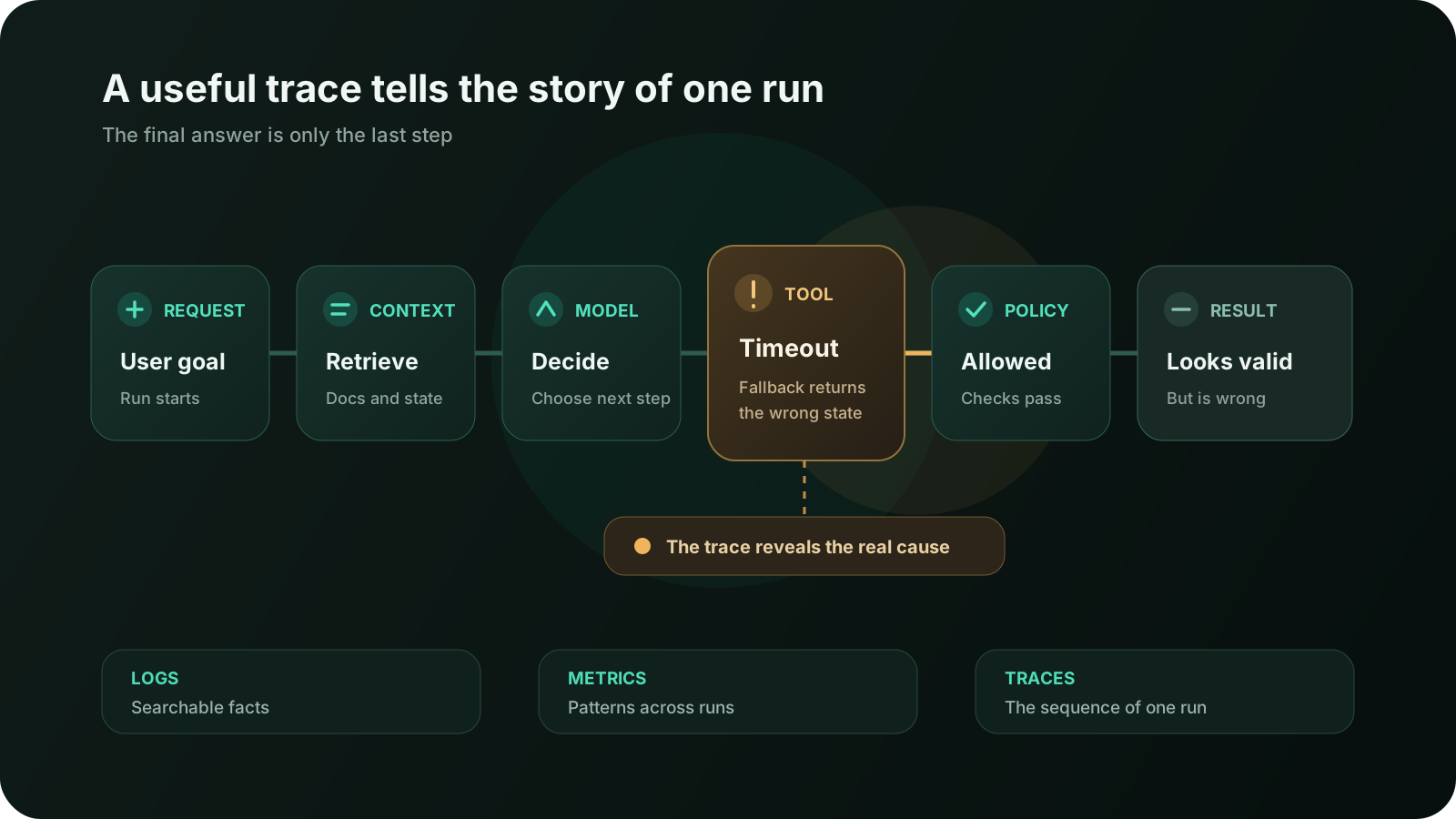
I need all three signals.
Logs give me searchable facts. Metrics show patterns across many runs. Traces let me reconstruct a specific failure.
Start with one run ID
The most useful observability feature is often the least glamorous: one ID that follows the work from beginning to end.
I want the same runId attached to:
- the incoming product request;
- model calls;
- retrieval queries and selected document IDs;
- tool calls and results;
- approval or guardrail decisions;
- retries and handoffs;
- the final response;
- user feedback and support reports.
If work continues in a background queue, the ID must travel with the job. If an agent delegates to another agent, the child trace should still point back to the parent run. If the user reports a problem later, support should be able to find the exact run without searching raw conversation text.
Without that thread, observability becomes a pile of unrelated evidence.
You know a database query was slow at 14:03. You know a tool timed out around the same time. You know a user disliked an answer. You do not know whether those events belong to the same story.
Correlation is what turns telemetry into an explanation.
What I record for every agent run
I do not want every possible field. I want enough information to reconstruct the product behavior without creating a second copy of all user data inside an observability platform.
At the run level, I normally want:
- run ID, session ID, and parent run ID if delegation is involved;
- start time, end time, duration, and final status;
- agent, workflow, prompt, and policy versions;
- model and provider identifiers;
- product surface and environment;
- number of model calls, tool calls, retries, and handoffs;
- input, output, cached, and reasoning token counts when available;
- estimated cost or a provider-neutral usage record;
- whether a person approved, edited, rejected, or interrupted the run;
- the product outcome, not only the technical outcome.
That last field matters.
completed means the workflow reached its final step. It does not mean the user
received a correct answer or completed their task.
A research agent can complete successfully with weak sources. A support agent can complete successfully after selecting the wrong customer. A coding agent can complete successfully while changing a file outside the intended scope.
Technical completion is useful. It is not product success.
The trace should follow product boundaries
I create spans around steps that can explain a meaningful change in behavior, latency, cost, or risk.
For a typical agent, that includes:
- receiving and normalizing the user's request;
- loading conversation or product state;
- retrieving documents or structured data;
- calling the model;
- executing a tool;
- running a guardrail or approval check;
- handing work to another agent;
- producing and delivering the final result.
I do not create a span for every helper function. That produces a huge trace that is technically detailed and practically unreadable.
A span should answer at least one useful question:
- Was this step reached?
- How long did it take?
- What broad input did it receive?
- What did it return?
- Did it fail, retry, or get blocked?
- How did it affect the next step?
The right level is usually the product operation, not the line of code.
OpenTelemetry's guidance makes a similar point: spans should represent significant operations with duration, while point-in-time occurrences are better represented as events. More detail is not automatically better observability.
A failure is more useful when it has a category
“Agent failed” is not a useful error type.
I want failures grouped by the part of the system that needs attention. A small taxonomy can go a long way:
- Intent: the request was ambiguous or misunderstood.
- Context: important history or product state was missing.
- Retrieval: the search query, ranking, filtering, or selected documents were poor.
- Model: the model reasoned incorrectly or produced an invalid response.
- Tool selection: the agent chose the wrong capability.
- Tool arguments: it chose the right tool but supplied the wrong inputs.
- Tool execution: the external system timed out, rejected the call, or returned an error.
- Policy: a guardrail or permission rule allowed or blocked the wrong thing.
- State: the data changed during the run or the agent acted on a stale version.
- Recovery: retry, fallback, rollback, or resume behavior was wrong.
- Delivery: the result existed but did not reach the user correctly.
- Interface: the system behaved correctly, but the UI made its state or uncertainty misleading.
These categories are not perfect, and some incidents belong to more than one. That is fine. The goal is not a universal ontology. The goal is to stop putting every failure into one bucket called “AI quality.”
Different failures need different fixes.
A prompt change will not repair an authorization bug. A larger model will not fix stale inventory data. More retries will not help a tool call with invalid arguments. Better retrieval will not fix a confirmation screen that hides the recipient.
One trace can change the diagnosis completely
Imagine a support agent tells a customer that their order is not eligible for a refund.
The answer is polished and cites the refund policy. The customer says it is wrong.
Looking only at the final message, the obvious theory is that the model misunderstood the policy.
The trace tells a different story:
- The agent correctly identified the order.
- It retrieved the current refund policy.
- It called
check_refund_eligibilitywith the correct order ID. - The tool timed out after five seconds.
- A fallback converted the missing result into
eligible: false. - The model explained that value fluently.
The model did not invent the wrong answer. The fallback did.
Without the trace, someone may spend an afternoon rewriting prompts and testing
models. The real fix is to represent the tool result as unknown, stop the
workflow, and tell the user that eligibility could not be checked.
This is why I am cautious about reading model output as if it were a direct view into the model's behavior. The output is often the last speaker in a much longer conversation between systems.
Trace inputs and outputs selectively
Full prompts and tool results are extremely useful during debugging.
They are also where the most sensitive information lives.
A support tool may return a customer's address and order history. A retrieval step may include internal documents. A coding agent may read secrets from a misconfigured file. A health product may process information that should never appear in a general-purpose logging system.
I do not make “log everything” the default.
Instead, I decide field by field:
- store stable identifiers instead of full objects where possible;
- record document IDs, versions, and relevance scores before recording document bodies;
- record a tool's operation, status, duration, and error type without its raw payload;
- redact tokens, credentials, cookies, and authorization headers before export;
- hash or tokenize identifiers when the original value is unnecessary;
- sample raw content only for defined debugging cases;
- separate content access from normal metrics access;
- set retention based on the sensitivity and actual debugging need;
- make deletion and access controls apply to telemetry too.
The OpenTelemetry guidance on sensitive data puts responsibility on the implementer to decide what is sensitive, minimize collection, and review what instrumentation libraries emit. That warning is especially relevant for agents because prompts, retrieved context, tool arguments, and tool results can all contain personal or confidential data.
Observability should reduce production risk. It should not quietly create a new data risk.
Record versions or lose the ability to reproduce
Agent behavior depends on more than the model name.
The same request can behave differently because of:
- a prompt edit;
- a tool description change;
- a new retrieval index;
- a policy update;
- a feature flag;
- a different model snapshot;
- a temperature or reasoning setting;
- a changed document;
- a new tool version;
- a different orchestration path.
If the trace says only model: x, it is not enough.
I want the prompt version, tool schema version, agent version, policy version, retrieval index version, and relevant feature flags attached to the run. I do not need to duplicate all of their content in every span. I need immutable IDs that let me reconstruct what was active.
This also makes release comparisons much more honest.
If quality falls after a deployment, I can group failures by version instead of arguing from screenshots. If only runs using one retrieval index are affected, I know where to look. If two prompt versions overlap during a gradual rollout, I can separate them.
Metrics should follow the user task
Tokens and latency are easy to measure, so teams often build dashboards around them first.
They matter. They are just not the point of the product.
I would rather know the cost per successfully completed user task than the
average cost per model call. I would rather know how often a support issue was
resolved than how often the final response returned 200.
For an agent workflow, useful metrics often include:
- task success rate;
- unresolved or abandoned run rate;
- tool error and timeout rate;
- retry rate and retries per successful task;
- guardrail block rate;
- approval, rejection, edit, and interruption rates;
- steps and tool calls per run;
- runs that hit time, token, or iteration limits;
- latency to first useful progress and total task duration;
- input, output, cached, and reasoning tokens;
- cost per run and cost per successful task;
- user correction, undo, or complaint rate;
- retrieval with no results, stale results, or low relevance;
- fallback usage and fallback success rate.
The exact list should match the job.
A research agent needs evidence and citation measures. A customer support agent needs resolution and escalation measures. A coding agent needs build, test, diff, rollback, and review outcomes. One universal “agent quality” dashboard usually hides the distinctions that matter.
Average latency hides the experience people remember
Agent workflows have long tails.
Most runs may finish in eight seconds while a small but important group takes ninety seconds because of retries or sequential tools. The average looks acceptable. The affected users experience a broken product.
I look at percentiles and step-level timing:
- time until the interface shows useful progress;
- retrieval duration;
- first model response;
- each tool's duration;
- approval waiting time;
- retry delays;
- final response time;
- total background completion time.
That distinction also prevents a slow human approval from being blamed on the model, or a slow tool from being hidden inside “agent latency.”
A trace timeline is particularly useful here. It shows which steps were sequential, which overlapped, and where time actually accumulated.
Cost needs the same end-to-end view
The price of one model call is not the cost of an agent task.
An agent may call the model six times, retrieve the same context repeatedly, retry a tool, delegate work, and then use a final model call to summarize the result. A single run looks inexpensive when each line item is viewed alone.
I record cost and usage by run, workflow version, customer segment, and outcome.
The question I care about is not only:
How many tokens did we use?
It is:
What did those tokens accomplish?
An expensive run that solves a valuable task can be a good product decision. A cheap run that loops, fails, and sends the user to support is not efficient.
This is also where context optimization becomes measurable. You can see whether a smaller, better-selected context improves latency and cost without reducing task success.
Production traces should feed the eval set
Observability and evaluation solve different problems.
Observability tells me what happened in real usage. Evals tell me whether a known behavior still works under repeatable conditions.
The best loop connects them.
When a production trace reveals a meaningful failure, I remove or anonymize sensitive data, reduce the case to its essential shape, and add it to the evaluation set. The incident becomes a regression test.
That is how a test set becomes representative of the product instead of a collection of examples the team imagined before launch.
In A Good Demo Is Not an AI Product, I described evals as repeatable tests for real user jobs. Production traces are one of the best sources for deciding which jobs and failures deserve permanent coverage.
The loop looks like this:
- detect a suspicious outcome through feedback or metrics;
- inspect the trace;
- classify the actual failure;
- fix the responsible layer;
- turn the failure into an eval case;
- monitor production for the same pattern.
Without observability, the eval case may test the wrong theory. Without evals, the same production failure may quietly return later.
Human decisions belong in the trace too
When an agent pauses for approval, the human decision is part of the run.
I want to know what the agent proposed, what the approval screen showed, whether the user edited anything, who approved it, how long they waited, and which exact action eventually ran.
That does not mean recording unnecessary personal data. It means preserving the decision boundary.
If users repeatedly edit the same field before approving, the agent may be getting that field wrong. If they reject one category of action, the product may be asking for too much autonomy. If approval waits dominate total duration, the workflow may need a better notification or resume experience.
The principles from Human-in-the-Loop AI Agents become much easier to improve when approvals are observable rather than treated as a black box.
Alerts should point to action, not anxiety
An alert that says “AI error rate increased” creates urgency without direction.
I prefer alerts tied to a failure class and a product threshold:
- refund eligibility tool timeouts exceed 2% for ten minutes;
- P95 end-to-end duration exceeds 30 seconds for support runs;
- more than 5% of runs hit the iteration limit;
- approval rejection rate doubles for the new policy version;
- retrieval returns no documents for a normally covered knowledge area;
- cost per successful task rises 25% after a workflow release;
- unknown tool outcomes appear at all for a financial action.
Each alert should lead to a useful slice of traces: the affected workflow, version, failure type, and time window.
If the first response to every alert is “open five dashboards and guess,” the system is collecting telemetry but not providing observability.
A small team does not need a giant platform
You can start with a modest setup.
For an early production agent, I would implement:
- one run ID propagated through the entire workflow;
- structured logs for model, retrieval, tool, policy, and delivery events;
- an end-to-end trace with spans around meaningful product steps;
- version IDs for prompts, tools, policies, and retrieval indexes;
- a small failure taxonomy;
- a few product-level metrics for success, latency, errors, and cost;
- strict redaction and retention rules;
- a way to connect user feedback to the relevant run;
- a weekly habit of reading real failed traces.
That last item matters more than the vendor.
You can install sophisticated instrumentation and still learn nothing if nobody looks at the traces. Ten carefully reviewed failures often teach more than a dashboard with thirty charts.
Start with the questions your team actually asks during an incident. Instrument the path needed to answer them. Add detail when a real investigation proves it is missing.
What I check before shipping observability
Before I trust the production setup, I want clear answers to these questions:
- Can support find a run from a user report without searching raw content?
- Can I see the full order of model, retrieval, tool, policy, and delivery steps?
- Do parent and delegated runs stay connected?
- Are prompt, tool, policy, model, and index versions recorded?
- Can I distinguish technical completion from user task success?
- Are retries, fallbacks, cancellations, and partial outcomes visible?
- Do failure categories point toward the responsible layer?
- Can I measure latency and cost for the whole task, not only one model call?
- Are approval and human intervention events included?
- Can production failures become anonymized eval cases?
- Are secrets and sensitive fields removed before export?
- Do we know who can access raw content and how long it is retained?
- Can an alert open a useful set of traces instead of a generic dashboard?
- Have we tested the telemetry itself with one known failure?
The last question catches a lot.
Teams often discover during the first incident that the run ID disappeared in a queue, a tool result was truncated, timestamps use different clocks, or the most important field was redacted with everything else.
Observability needs testing too.
The goal is not to watch the model think
There is a temptation to describe AI observability as looking inside the model.
That is not what I expect from it.
I do not need a magical view of hidden reasoning. I need a reliable view of the system behavior I actually control: the inputs I assembled, the documents I selected, the tools I exposed, the arguments the agent generated, the results those tools returned, the policies I enforced, and the outcome the user saw.
That is enough to fix a large share of production failures.
It also keeps the engineering conversation grounded. Instead of saying “the AI was confused,” we can say:
- the retrieval query omitted the product version;
- the tool returned an unknown state that the adapter converted to false;
- the workflow retried after a successful but delayed response;
- the policy version blocked the required document;
- the final answer used stale context from an earlier turn.
Those are problems a team can act on.
Conclusion
An AI agent can fail without throwing an exception.
It can choose the wrong source, call the wrong tool, misunderstand an empty result, repeat an action, or produce a polished explanation for bad data. If I record only the final answer, all of those failures look roughly the same.
Good observability restores the missing story.
Give every run an identity. Trace the steps that matter. Keep logs structured. Measure the user task, not only the model call. Record versions. Classify failures. Connect human decisions. Protect sensitive data. Turn real incidents into eval cases.
Then, when someone says “the agent was wrong,” the investigation can move past guessing.
Not because the system became simple.
Because the path became visible.
FAQ
What is AI agent observability?
AI agent observability is the ability to understand how an agent produced a result across model calls, retrieval, tools, policies, handoffs, retries, and human decisions. It combines logs, metrics, and end-to-end traces.
What is the difference between AI agent monitoring and tracing?
Monitoring shows the overall health and trends of the system. Tracing reconstructs the ordered steps of one run, making it useful for debugging a specific failure or slow task.
Should I log full prompts and model responses?
Not by default. Full content can be useful for debugging but may contain personal, confidential, or credential data. Prefer identifiers, summaries, redaction, controlled sampling, limited access, and retention rules based on a real debugging need.
Which metrics matter most for AI agents?
Start with task success, unresolved runs, tool failures, retries, latency, cost per successful task, human intervention, guardrail outcomes, and user corrections. Add workflow-specific measures instead of relying on one universal quality score.
How are traces different from evals?
Traces explain what happened during a real run. Evals repeat a defined case to check whether expected behavior still works. Production traces are a valuable source of new regression cases for the eval set.
Can OpenTelemetry be used for AI agents?
Yes. OpenTelemetry provides traces, metrics, logs, and evolving generative AI semantic conventions. The instrumentation still needs product-specific spans, privacy controls, useful outcome fields, and a failure taxonomy that matches the workflow.
Discussion
Responses
No approved responses yet.