
When people talk about AI features, they often start with the model.
Which model should we use?
How big is the context window?
Can we send the whole document?
Can it read a full video transcript?
Would the answer be better if we just gave it more context?
Those are fair questions. I ask them too.
But in real products, I rarely start there.
The more useful question is usually this:
what context does the AI actually need to help the user right now?
Not the maximum context. Not everything we have. Not a long prompt with every possible detail just in case.
The right context.
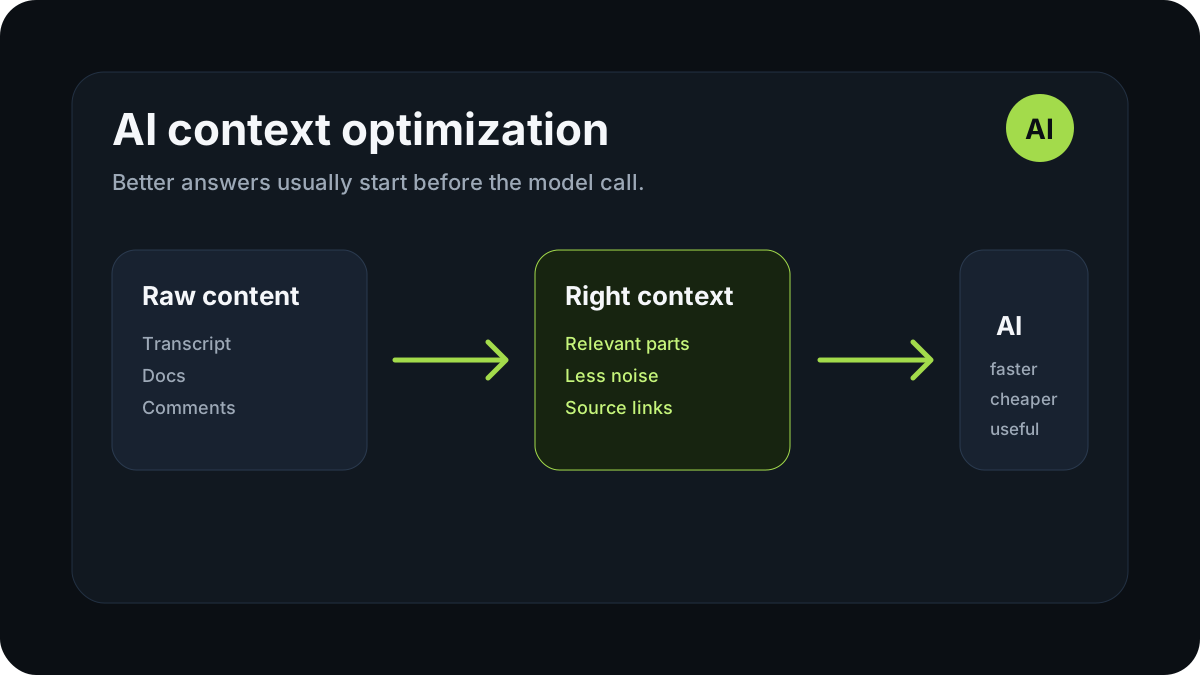
That is the part I keep coming back to when I design AI features. The model matters, of course. But the product often becomes faster, cheaper, and more useful when we get better at choosing what the model should see.
That is how I think about context optimization.
The model is not always the problem
It is easy to blame the model.
If the answer is weak, use a stronger model.
If the answer is vague, use a bigger context window.
If the feature is slow, try another provider.
If the feature is expensive, switch to a cheaper model.
Sometimes that is the right move.
But very often the real issue is simpler: we are giving the model the wrong material to work with.
Take a long YouTube video as an example.
The lazy version is to extract the entire transcript and send it to the model every time the user asks a question. For a demo, that can look good enough. The user asks something, the AI replies, and the feature feels impressive for a few minutes.
Then the product starts to behave like a real product.
Long videos contain a lot of text. A lot of text means more tokens. More tokens mean higher cost, slower responses, and more room for the model to drift around the transcript instead of focusing on the exact part that matters.
At that point, the issue is not that the AI is bad.
The issue is that we asked it to work with a pile of unsorted context.
More context is not always better
There is a natural temptation to think:
If we give the model more context, the answer will be better.
That can be true for broad tasks.
If the user asks, “What is this document about?” or “Can you summarize the main ideas from this video?”, then wider context helps. The model needs a larger view to understand the whole thing.
But many product questions are not broad.
They are specific.
A user asks:
What did the speaker say about pricing?
Or:
Where does the tutorial explain the deployment step?
Or:
Did anyone mention this issue in the comments?
In those cases, sending everything can make the answer worse, not better.
The model might find the right part. It might also pick a similar section, blend two different moments together, or return a generic answer that sounds correct but does not really help.
For specific questions, I usually prefer a different flow:
- find the most relevant pieces first;
- send those pieces to the model;
- ask the model to answer from that context;
- show the user where the answer came from.
That is less magical than “AI reads everything”.
But it is usually better product design.
Context is a product decision
I do not see context optimization as only a backend or prompt engineering detail.
It is a product decision.
The context we send to AI directly affects the user experience:
- how fast the answer feels;
- how specific the answer is;
- whether the user can verify it;
- how much each request costs;
- how predictable the system is;
- how painful the product will be to scale;
- whether the AI feature feels useful or random.
A lot of AI products have the same basic shape:
there is an input, a button, a loading state, and an answer.
That is not enough.
The harder questions are hidden underneath:
- what did the model actually see?
- did it see the right source?
- can the user go back to that source?
- what happens when the content is long or noisy?
- what should happen when the answer is incomplete?
- what data should never be sent at all?
This is where the real work starts.
Not in adding an AI box to the interface, but in deciding how AI fits into the workflow.
What I try to send to the model
When I design an AI feature, I try not to ask “how much can we send?” first.
I ask:
what is the smallest useful context for this moment?
Depending on the product, that might include:
- relevant text fragments;
- sections with the closest semantic match;
- a page title, video title, or document metadata;
- a small amount of surrounding context;
- a user-selected item or range;
- timestamps or source references;
- a short instruction about how the answer should behave;
- constraints the model should not ignore.
For example, if a user asks about one topic in a video, I do not need to send the whole transcript by default. I need to find the parts that are most likely to contain the answer, send those, and ask the model to stay grounded in them.
That is less exciting than a huge prompt.
But it is much closer to how a reliable product should work.
What I try not to send
Choosing what not to send is just as important.
I try to avoid sending:
- long chunks of text just in case;
- repeated content;
- irrelevant sections;
- raw HTML noise;
- navigation text, boilerplate, and layout clutter;
- content that does not affect the answer;
- private or sensitive data unless it is truly required;
- an entire document when the user only needs one part.
This is not only about saving money.
Less noise often means a better answer.
When the model receives cleaner context, it has fewer distractions. The answer becomes more direct. The user does not get a polished paragraph that vaguely touches the topic. They get something they can actually use.
That is the difference between an AI demo and an AI feature that belongs in a product.
Cost matters earlier than people think
At the beginning of a product, it is easy to say:
We do not have many users yet, so cost does not matter.
I understand that thinking, but I do not fully agree with it.
AI cost is not only a billing problem. It is also an architecture signal.
If the first version of a product sends too much context on every request, you are not just spending more money. You are building the user experience around a slow and expensive operation.
The code starts to assume it can send everything. The interface starts to assume the user will wait. The product behavior starts to depend on a pattern that may not survive real usage.
Then usage grows, and suddenly every active session is more expensive than expected.
That is a bad moment to realize the architecture was wasteful from the start.
So I like thinking about cost early.
Not because every feature needs to be cheap at all costs. Some AI features are worth paying for. But a product should know where the money is going and why.
If we can make the answer faster and cheaper by sending better context, that is usually worth doing.
Latency changes how the feature feels
A correct answer can still feel bad if it takes too long.
This matters a lot in browser workflows.
When someone is inside a YouTube video, a dashboard, a document, or an internal tool, they are already in the middle of a task. They do not want a separate AI process that interrupts everything. They want help in the same flow.
Find the thing.
Check the detail.
Jump to the source.
Copy the result.
Move on.
Latency is not just a technical metric here.
It is part of the product experience.
If the AI responds quickly, it feels like a tool. If it takes too long, it starts to feel like a separate workflow the user has to wait for.
Context optimization helps with that. Less irrelevant context means fewer tokens, faster processing, and less friction.
That does not make every AI feature instant. But it does make the feature feel more intentional.
Grounded answers need traceable context
One of the things I care about most in AI products is whether the user can check the answer.
AI should not feel like a black box.
If the product answers based on a video, document, page, transcript, or comment thread, the user should have a way to understand where the answer came from.
This is especially important for video.
A summary can be helpful, but it often removes the path back to the original source. You get the conclusion, but not the moment that supports it.
I prefer a more grounded flow:
- find the relevant part;
- generate the answer;
- show the timestamp or source reference;
- let the user jump back to the original moment;
- keep the answer inspectable.
That is not just a nice detail.
It is trust design.
A timestamp is not only navigation. It is a way for the user to verify the AI instead of blindly accepting it.
How this applies to Cuelio
This way of thinking directly affects how I am building Cuelio.
Cuelio is a YouTube extension I am working on and testing. The goal is not to make another AI summarizer.
I want YouTube to feel more like a searchable knowledge base.
The first version is focused on the workflow that feels most useful in long videos:
- search the transcript;
- jump to the exact timestamp;
- ask AI questions based on the video content;
- keep answers connected to sources;
- search comments without endless scrolling;
- save videos for later;
- export transcripts when needed.
Context optimization is a very practical problem there.
If a user asks a question about a long video, sending the full transcript to the model every time is not the best default. It can be slow, expensive, and less focused than it should be.
A better approach is to find the relevant transcript parts first, pass those to the AI, and return an answer that still points back to the original video moment.
That makes the product cheaper to run, but also more honest for the user.
The answer is not floating in the air. It has a source.
How this applies to client work
This problem is not unique to YouTube.
It shows up in almost every product where AI needs to work with real content:
- internal knowledge bases;
- CRM notes;
- support tickets;
- educational platforms;
- documentation;
- video and audio archives;
- browser extensions;
- SEO and content audit tools;
- internal research workflows.
A client might describe the request very simply:
We want to add AI to the product.
But the real questions start after that.
What data should the AI see?
What should it never see?
How do we find the relevant context?
How do we make the answer verifiable?
How do we avoid burning money on tokens?
How do we keep the UX fast?
How do we fit the feature into the real workflow instead of adding a chat box on top?
That is where AI product engineering becomes more interesting than just connecting an API.
The value is not only in making the model respond.
The value is in making the response useful at the exact point where the user needs it.
The practical rule I use
My rule is simple:
find the right context first, then ask AI to help.
Not the other way around.
If an AI feature starts with “let's send everything to the model”, I usually want to pause and look closer.
What is the user actually asking?
Where is the answer likely to be?
Which parts of the content matter?
Can we show the source?
Can this be faster?
Can this be cheaper?
Can this be easier to trust?
Very often, those questions improve the product more than a bigger model or a longer prompt.
The best AI features I have used rarely feel like magic.
They feel like the product understands the task, brings the right context forward, and uses AI only where it adds value.
Conclusion
AI products do not become useful just because they include AI.
They become useful when the AI sees the right context, appears in the right part of the workflow, and helps the user do something faster, clearer, or with more confidence.
That is why I treat context optimization as a product decision, not only a technical detail.
Especially at the beginning of a product.
Early on, it is easy to overbuild, overspend, and hide messy thinking behind a large prompt. I would rather start smaller:
understand the task, find the relevant context, give the model what it needs, and keep a path back to the source.
It does not sound like magic.
But in real products, that is often what makes AI useful.
Discussion
Responses
No approved responses yet.