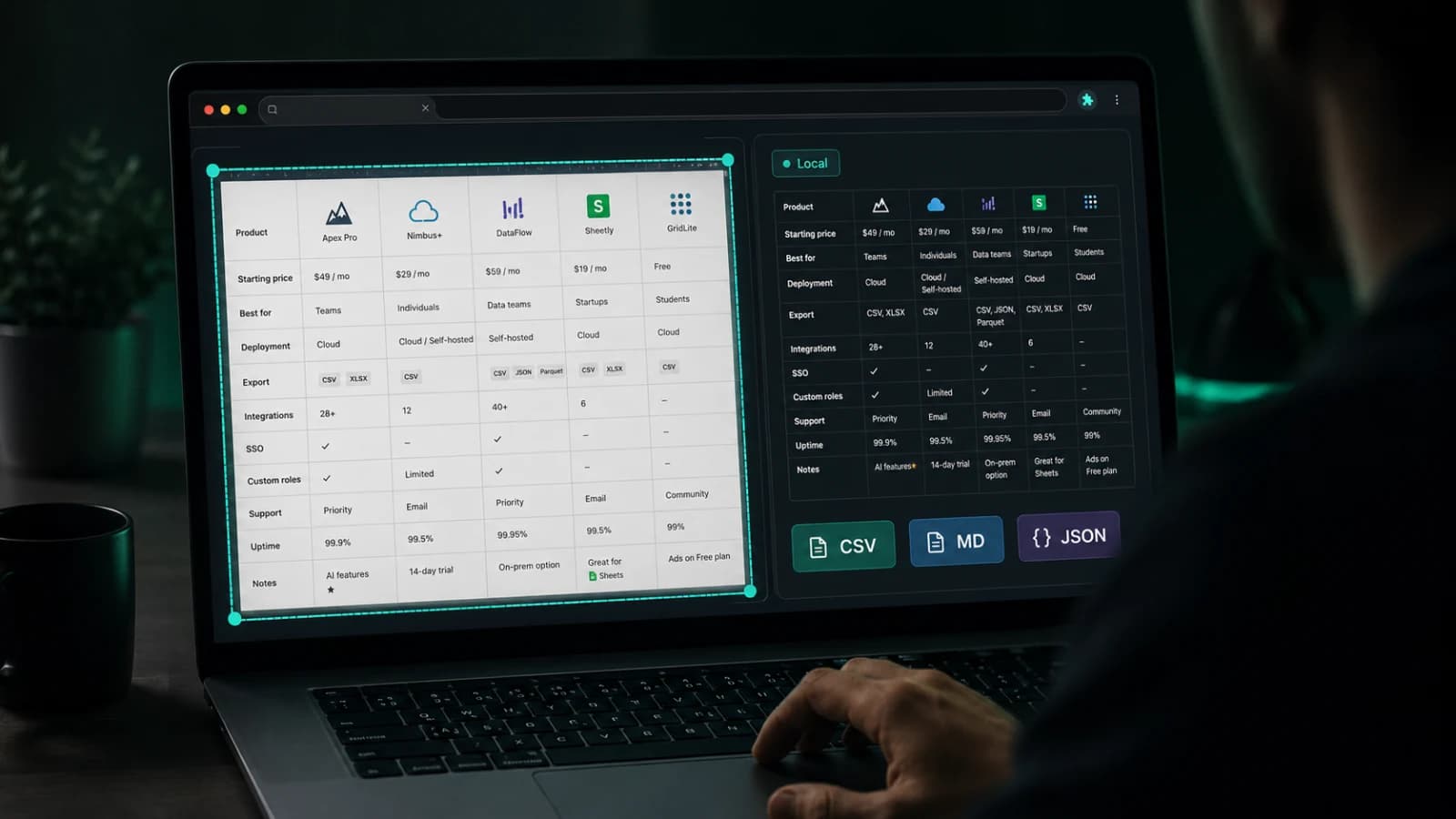
Copying a table sounds simple until the table is messy, the destination expects structure, and the user needs to trust the result before it reaches the clipboard.
That was the starting point for TableSnap.
I kept running into this in places that looked boring on the surface and costly in practice: pricing pages, comparison tables, docs tables, admin screens, and public datasets that were clearly meant to be read, but not clearly meant to be reused.
At first glance, the problem looks almost too small to deserve a product.
You see a table on a page. You copy it. You paste it into Excel, Google Sheets, Notion, Airtable, or a Markdown doc. Done.
Except that it is usually not done.
The rows break. The headers shift. Pricing cards pretend to be tables without actually behaving like tables. Comparison layouts mix icons, notes, buttons, and duplicated labels into something that looks structured on screen but falls apart the moment you try to reuse it somewhere else.
That is the gap I wanted to solve.
Not a giant scraping platform. Not a heavy data pipeline. Not another dashboard you open in a separate tab.
I did not want to build something that sounds impressive in a product deck and still feels annoying the first time someone actually uses it.
A focused local-first browser extension for the moment when you need to move structured data from the web into a tool that expects structure.
The problem was never "copy"
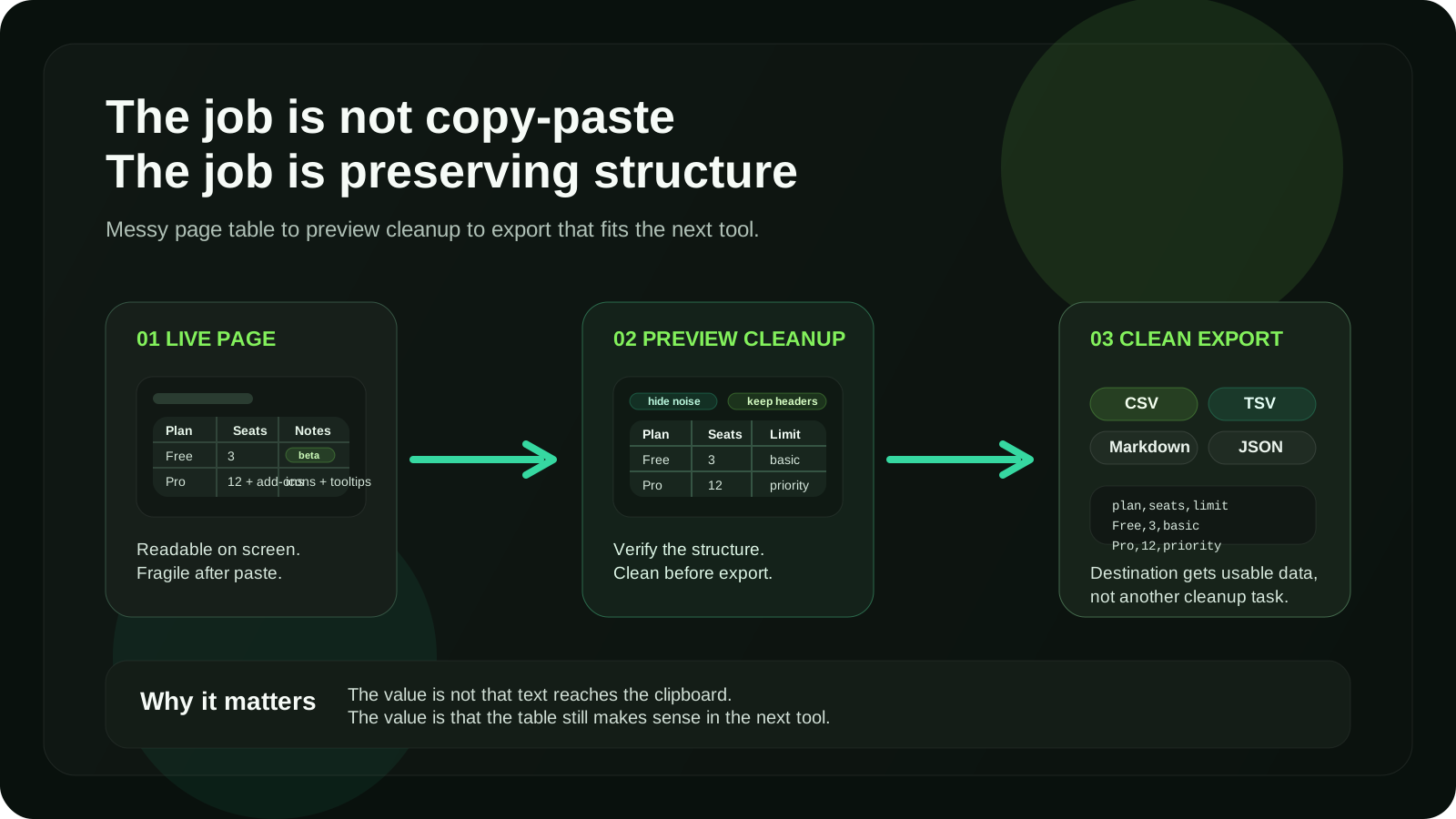
The more I looked at this workflow, the more obvious it became that the hard part was not copying.
The hard part was preserving meaning.
When someone says they want to copy a web table, they usually mean something closer to this:
I need the useful structure from this page to survive the trip into the next tool.
That is a very different product problem.
It is not about whether text can reach the clipboard. Browsers already do that.
It is about whether the exported result still feels usable after it leaves the page.
That matters because the destination is not neutral.
A spreadsheet wants rows and columns that line up cleanly. A Markdown doc wants something readable in plain text. JSON wants a predictable shape for scripts or automation. A research workflow may need something quick to clean, annotate, and share. A product team might want to drop the result into Notion or Airtable without another round of manual repair.
So the real task is not "copy web tables."
It is:
Detect the structure, let the user verify it, clean the messy parts, and export it in the format the next tool actually needs.
That became the center of the product.
I like product problems like this because they look small until you try to make them feel reliable.
That is usually where the real work is.
Why this became a browser extension
I did not want this workflow to start with a dashboard.
If the table is already on the page, the product should stay close to the page.
That sounds obvious, but it rules out a lot of awkward product shapes.
A hosted tool that asks for a URL can work for some extraction jobs. It feels wrong for this one. The user is already looking at the source. They are already scrolling, comparing columns, checking whether the page version is the one they actually want, and deciding what should make it into the export.
Sending them away from that moment creates unnecessary friction.
So the browser itself became the right product surface.
That decision shaped the browser extension UX:
- the workflow had to feel immediate
- the result had to stay visually close to the source page
- the extension had to help with trust, not just output
- the product had to stay focused instead of becoming general-purpose scraping
TableSnap works better as a browser-native tool because web table workflows are already happening inside the browser. The extension does not need to invent a new workspace. It needs to make the existing one less fragile.
Why I did not start with a bigger data product
It would have been easy to frame this as a larger SaaS from day one.
Projects. Saved URLs. Cloud jobs. Team workspaces. Extraction history. Shared pipelines. Maybe even scheduled scraping.
Some of that could make sense later.
I did not want to start there.
The first product question was much narrower:
Can I make copying web tables feel trustworthy enough that people stop doing repair work after every paste?
If that part is weak, a bigger backend does not fix the product. It only hides the weakness behind more surface area.
Starting with a local-first browser extension keeps the product honest.
The table detection has to work. The preview has to help. The export has to make sense immediately. The workflow has to earn its place the first time someone needs it.
That constraint is useful.
The workflow had to create trust before export
One thing I did not want was a "click and hope" product.
That is the easiest way to make table extraction feel unreliable.
If the extension instantly copies something and the user only discovers the damage after pasting it into another tool, the workflow already lost. The error arrives too late.
That is why TableSnap is built around a compact three-step flow:
- detect the table on the live page
- clean the extracted structure in preview
- export in the format the destination expects
The preview step matters more than it might seem.
Preview is not decorative UI. It is the trust boundary.
It gives the user a chance to answer the questions that actually matter:
- Did the structure come through correctly?
- Are the headers useful?
- Did noise from the page leak into the result?
- Is this ready for Sheets, Notion, Markdown, or JSON?
Without that checkpoint, the extension becomes a black box. With it, the workflow starts to feel dependable.
That is a product rule I keep coming back to:
When the output is meant to travel, users need confidence before the handoff, not after it.
"HTML table to CSV" is only part of the story
If I described TableSnap too narrowly, I could call it an HTML table to CSV
tool.
That would be technically true and product-wise incomplete.
Some pages use clean, textbook <table> markup.
Many do not.
Some use ARIA grids. Some use comparison layouts that are built from stacked containers and still behave like tables to the human eye. Some pages mix icons, badges, empty cells, repeated labels, or sticky headers into the layout. Some tables are clearly meant for reading, but not clearly authored for export.
That is where DOM table extraction stops being trivial.
The job is not just to grab text from the page. The job is to interpret enough structure that the result is still useful somewhere else.
That is also why I wanted TableSnap to support more than ideal HTML tables, including ARIA grids and supported layout-based comparison tables.
Real-world workflows do not happen on perfect demo pages.
They happen on pricing pages, documentation sites, vendor comparisons, admin surfaces, public datasets, and random pages where the author cared more about presentation than export.
If the product only works on polite markup, it misses the point.
Why local-first mattered
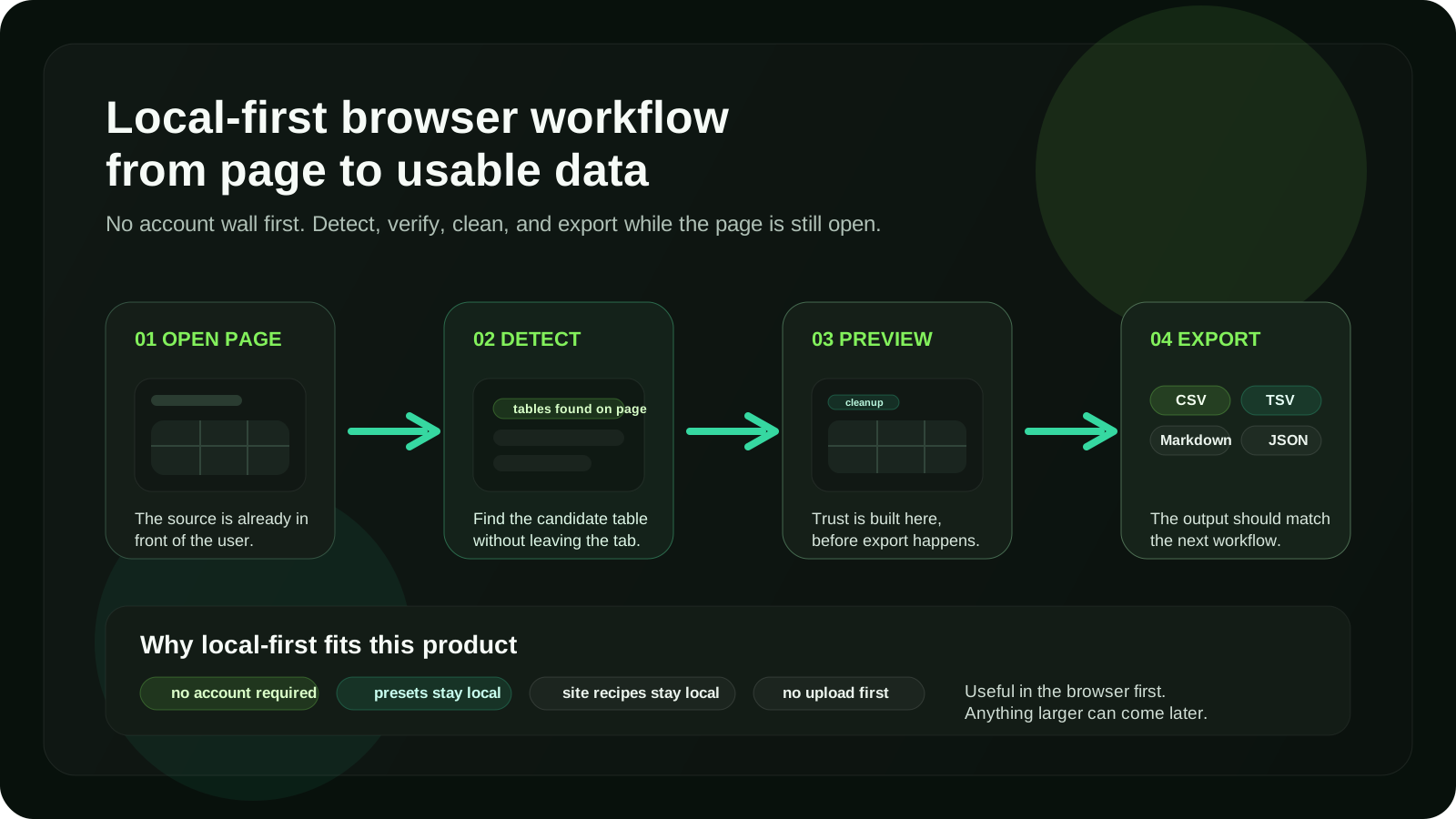
TableSnap is local-first because this workflow should feel lightweight.
I did not want the main experience to depend on creating an account, waiting for remote processing, or sending a simple page-level extraction task through a backend before the user gets value.
For this kind of product, local-first is not only a technical preference. It is part of the UX.
The user is already inside a page. They want a quick result. They want to tweak the output, export it, and move on.
That pushes the product in a clear direction:
- the core extraction workflow should stay in the browser
- settings and presets should stay close to the workflow
- site-specific recipes should stay local to the user
- the product should feel useful before any account-shaped idea enters the room
Local-first also helps the permission story stay understandable.
Broad browser access is only acceptable when the product purpose is narrow and clear. In this case, the purpose is simple:
The user opens a page and asks TableSnap to help them extract a table from that page.
That is a much healthier boundary than vague background behavior.
Export formats are product decisions, not just checkboxes
I wanted the export layer to reflect real destinations, not just technical possibilities.
That is why TableSnap exports to CSV, TSV, Markdown, HTML, and JSON.
Each format solves a different handoff:
- CSV and TSV are for spreadsheets and quick data cleanup in Excel or Google Sheets
- Markdown is for docs, notes, issues, and workflows that need readable plain text
- HTML is useful when table structure needs to travel with richer formatting
- JSON is for scripts, automation, and structured downstream processing
This part matters because people do not extract tables for fun. They extract them because the data needs to go somewhere.
The export format is not the end of the feature. It is the start of the next workflow.
That sounds small, but it changes how the product should be designed.
A table to Markdown flow should feel different from a table to JSON flow. One is optimized for human reading. The other is optimized for machine handling. A spreadsheet export often needs a shape that feels clean immediately, because the user will notice broken columns in seconds.
Good product design respects the destination, not just the source.
What I wanted TableSnap to avoid
Focused tools get worse when they drift into feature theater.
For TableSnap, I want to avoid a few common traps:
- pretending that extraction alone is enough without a cleanup step
- hiding the result until after the export
- turning the product into a generic scraping platform
- requiring an account before the first useful action
- supporting only one export shape and forcing every workflow into it
- collecting permissions that do not map back to the core job
- optimizing for perfect demo pages instead of messy real ones
The product should stay honest about what it is.
TableSnap is not trying to replace every data pipeline. It is trying to make one frequent, annoying browser task feel clean and trustworthy.
That is enough.
What building TableSnap reinforced for me
TableSnap reminded me that some of the best product opportunities are hiding inside workflows that look too small to notice.
"Copy a table" sounds boring.
But a lot of useful software lives in exactly that territory: moments where the job sounds simple, yet the current workflow is full of friction, uncertainty, and tiny repeated cleanup costs.
Those are often good product surfaces because the pain is real, even if it does not sound glamorous.
I trust repeated friction more than big category language.
If people keep hitting the same annoying edge between one tool and the next, there is usually product space there.
Building this also reinforced a broader product-engineering lesson:
The product is not the extraction. The product is the confidence that the extracted result will still make sense in the next tool.
That is why TableSnap is not only about DOM table extraction.
It is also about browser extension UX, trust before export, local-first product boundaries, and choosing formats that match how people actually work with structured data after it leaves the page.
If the product does those things well, then a very ordinary action starts to feel much less fragile.
And that is usually a good sign.
FAQ
What is TableSnap?
TableSnap is a local-first browser extension for detecting web tables, cleaning messy extracts in preview, and exporting usable data as CSV, TSV, Markdown, HTML, or JSON.
Is TableSnap just an HTML table to CSV tool?
No. CSV export is part of the workflow, but the product is broader than that. TableSnap is designed around web table workflows: detection, preview cleanup, and export for different destinations such as spreadsheets, docs, and automation.
Does TableSnap only work with normal HTML tables?
No. TableSnap is designed to support more than textbook HTML tables, including ARIA grids and supported layout-based comparison tables where the page behaves like a table even if the markup is less direct.
Why make it local-first?
Because the workflow should feel lightweight, fast, and close to the page. Keeping the main extraction flow in the browser reduces friction and makes the product useful without turning a simple task into an account-first system.
What export formats does TableSnap support?
TableSnap supports CSV, TSV, Markdown, HTML, and JSON export formats.
Who is TableSnap for?
TableSnap is for people who move structured data from webpages into spreadsheets, docs, databases, research notes, Notion, Airtable, or JSON-based automation workflows.
Related reading:
Discussion
Responses
No approved responses yet.