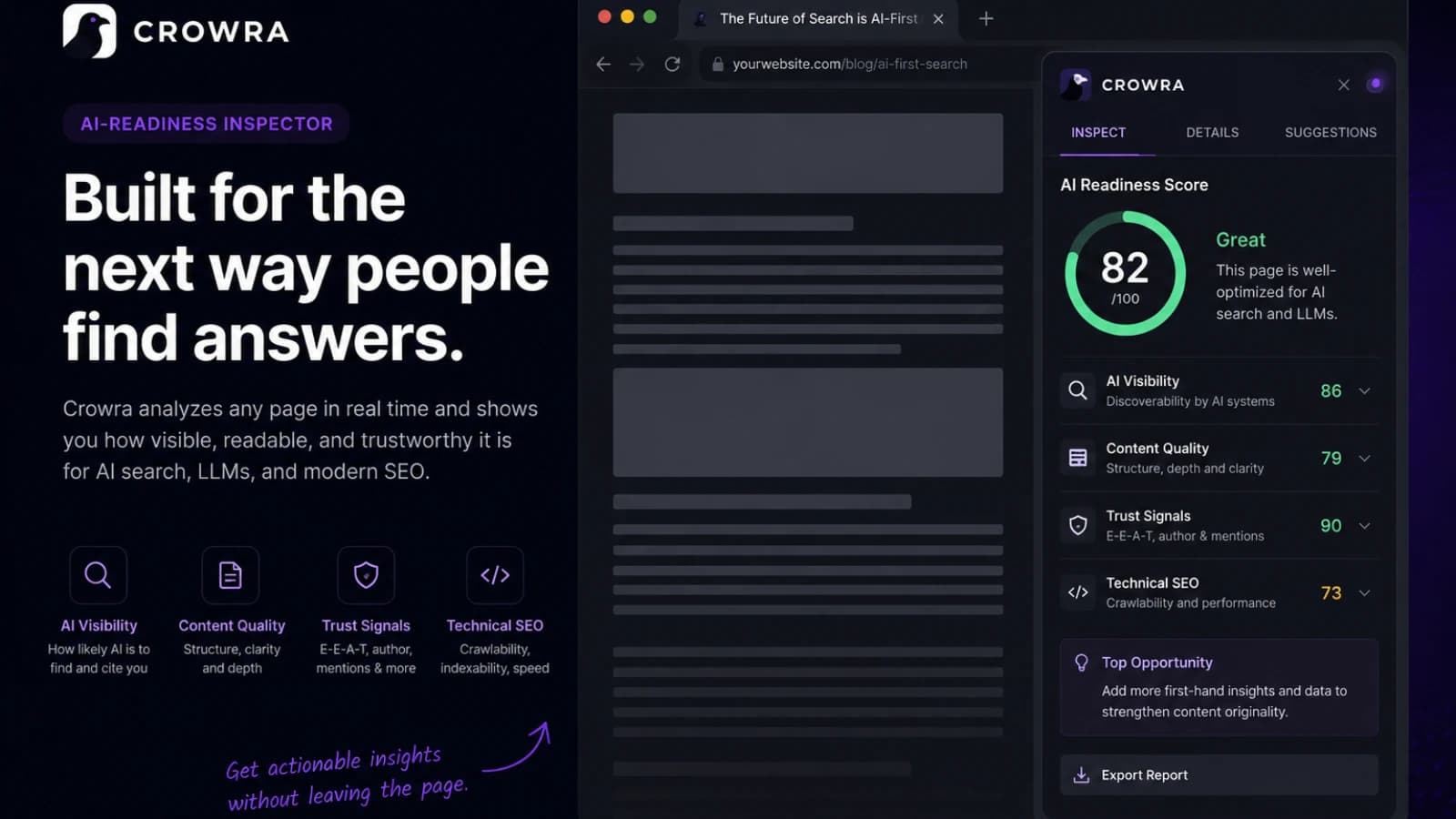
Most SEO tools assume you are ready to leave the page.
Open a dashboard. Paste a URL. Wait for a scan. Open another tab for schema. Open another tab for links. Open another tab for robots. Check the page again. Copy findings into notes. Then try to remember which issue was actually worth fixing first.
That workflow works when you are doing a deep audit.
It feels too heavy when you are reviewing the page in front of you.
That is the gap I wanted to solve with Crowra.
Not a full SEO platform. Not a rank tracker. Not a crawler SaaS. A focused Chrome side-panel inspector for the moment when a page is almost ready and still needs one serious pass across SEO, technical health, schema, links, accessibility, and AI / GEO readiness.
The product idea is simple:
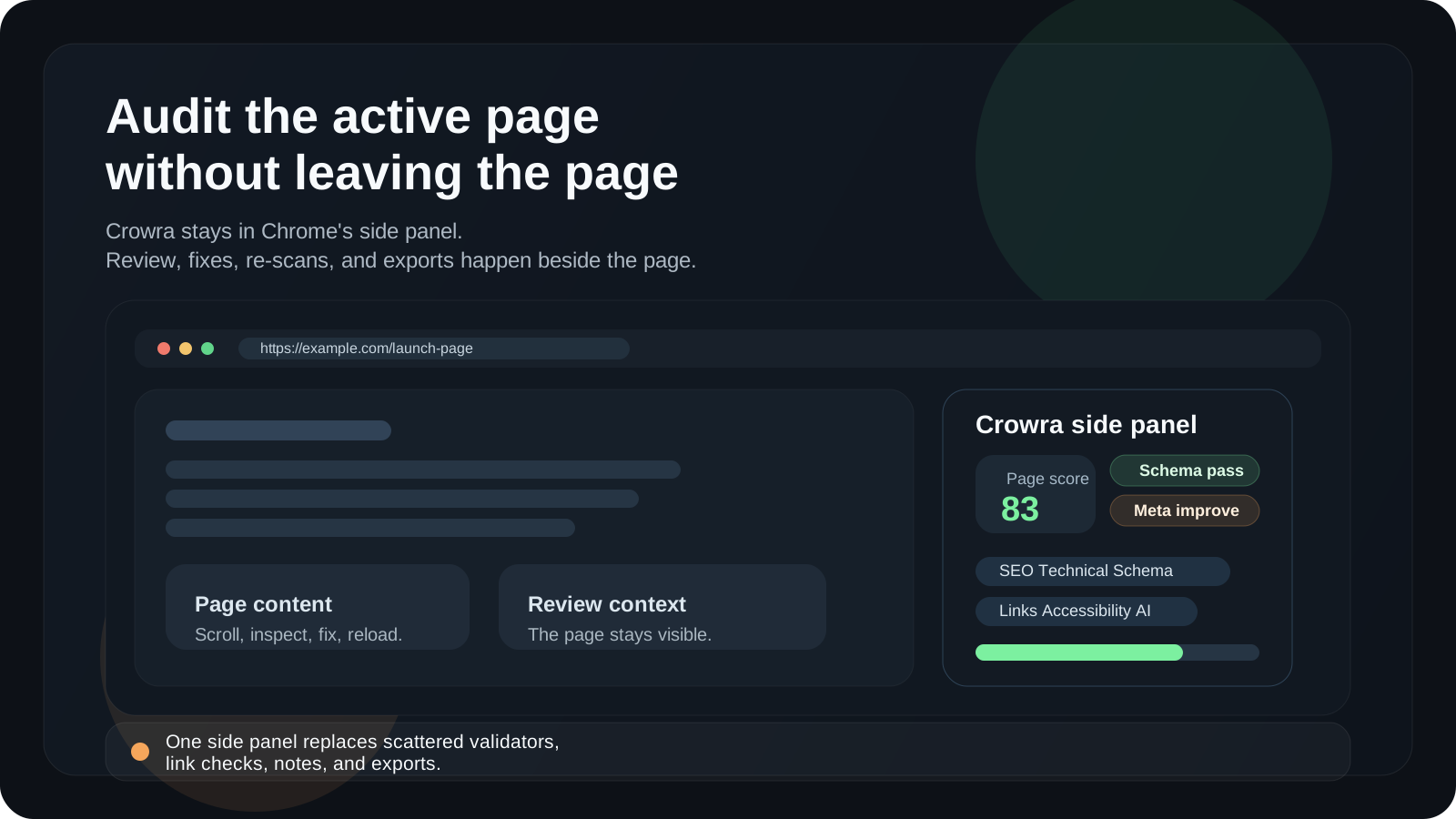
Audit the active page without leaving the active page.
That one constraint shaped almost every technical and product decision.
The problem I kept running into
When I build and ship pages, the review step is rarely one clean task.
It is a stack of small checks:
- does the page title exist?
- is the meta description useful?
- is the canonical correct?
- can crawlers access the page?
- is the schema valid enough?
- are links broken?
- does the page have enough content context?
- are there obvious accessibility misses?
- is the page understandable for AI search surfaces?
- can I export the result and share it with someone else?
None of these checks are hard alone.
The annoying part is the switching.
A page review quickly turns into a scattered tab stack: browser DevTools, schema validators, link checkers, SERP preview tools, robots testers, manual notes, and a spreadsheet if the review needs to travel.
That is fine for a large audit.
It is too much friction for everyday publishing.
I wanted Crowra to feel closer to a checklist that lives beside the page instead of a separate destination.
Why a Chrome side panel made sense
The side panel became the product shape because it matches the review moment.
A popup is too small. A full dashboard pulls you away from the page. A content overlay risks getting in the way of the page itself. A side panel can stay open while the user scrolls, checks sections, fixes something, reloads, and runs the audit again.
That interaction model is important.
Crowra is not meant to be opened once a month for a giant report. It is meant to be used during work:
- open the page
- open Crowra
- run a scan
- review prioritized signals
- fix the page
- re-scan
- export the result if needed
The tool should stay close to the surface being inspected.
That is the same kind of product thinking I used when I wrote about one-tap offline place saving for Apple Watch and iPhone.
The surface matters because the moment matters.
For Pean, the moment was saving a private place before it disappears from memory. For Crowra, the moment is reviewing a page before it goes live, after a content update, during a migration, or before someone else asks why search engines and AI answer surfaces are not understanding it properly.
Different product. Same rule:
Design around the moment, not around the feature list.
What Crowra checks
Crowra started as a page audit tool, but I did not want it to be only another metadata checker.
The page review needed to cover the signals I actually look at before shipping a page.
SEO basics
The first layer is traditional on-page SEO:
- title
- meta description
- headings
- H1 structure
- internal anchor text
- robots meta
- Open Graph
- Twitter Cards
- SERP preview signals
These checks are not glamorous, but they catch real mistakes.
A page can have beautiful design and still ship with a weak title, no description, a duplicated H1, or missing social preview data.
Crowra keeps these checks visible because basic metadata still matters.
Technical health
The second layer is technical:
- HTTPS
- viewport
- charset
- canonical tags
- canonical mismatch
- absolute canonical URLs
- hreflang inventory
- mixed content signals
- resource breakdowns
- canonical chain following
This is the kind of work that often gets split between DevTools, source view, and random browser extensions.
I wanted the technical section to answer one question quickly:
Is this page technically safe enough to be indexed, shared, and crawled?
Not perfectly optimized. Not scored for every performance metric in the world. Just safe enough to move forward or clear enough to know what needs fixing.
Schema and entities
Structured data became its own section because schema issues are usually easier to understand when they are shown as entities, not just raw JSON.
Crowra checks:
- JSON-LD
- Microdata
- RDFa
- parse errors
- entity types
- missing recommended fields
- common types like Article, BlogPosting, Product, Organization, WebSite, and WebPage
A lot of schema tools tell you whether something is valid. That is useful. But during a page review, I also want to understand what the page is claiming to be.
Is it an Article? A WebPage? A Product? An Organization? Is the schema helping search engines understand the page, or is it just present?
That is the difference between validation and inspection.
Links and same-site crawl
A single page audit is useful, but links often need a wider view.
That is why Crowra has two link modes:
- page-level link extraction
- same-site crawl from the Links tab
The page-level view is for quick inspection: internal links, external links, nofollow links, and anchor patterns.
The crawl view is for launch and migration checks: broken links, redirects, noindex pages, inbound links, duplicate titles, duplicate descriptions, and exportable crawl results.
I did not want Crowra to become a giant crawler SaaS.
But I did want it to answer a practical launch question:
If I ship this site today, are there obvious broken pages or crawl issues I should catch first?
That is where a lightweight same-site crawl makes sense.
Accessibility signals
Crowra is not an accessibility compliance certifier.
That distinction matters.
But there are still useful checks that belong in a page review:
- image alt text
- empty alt text
- form label hints
- landmark checks
- heading order
- focus heuristics
- contrast-related signals
The goal is not to pretend one automated pass can replace a real accessibility review. The goal is to catch obvious misses before they become production bugs.
AI / GEO readiness
The newest part of the product is AI / GEO readiness.
GEO, in Crowra, means Generative Engine Optimization. I treat it as a review surface for the signals that make a page easier to understand for AI answer engines and discovery systems.
Crowra checks things like:
llms.txt- AI-bot access through
robots.txt - E-E-A-T signals
- author and date hints
- About and Contact links
- content density
- reading and completeness hints
- schema-derived entity hints
I am careful with the language here.
No tool can guarantee that an AI answer engine will cite a page. That would be a false promise. But a tool can help review whether the page is crawlable, structured, readable, entity-rich, and supported by basic trust signals.
That is what I want Crowra to do.
Not predict citations.
Surface readiness signals.
The architecture behind the scan
The extension architecture is intentionally simple.
Crowra is built with React, TypeScript, Vite, Tailwind, Zustand, Lucide, Chrome Manifest V3, the Chrome side panel API, and Chrome storage.
The scan flow has a few clear pieces:
- the side panel asks for a scan
- the active tab is identified
- a packaged content script extracts a page snapshot
- the background service worker handles browser-level work
- the audit engine runs rules against the snapshot
- the side panel renders the result
- the result can be stored in local history or exported
The important object is the page snapshot.
In simplified form, I think about it like this:
type PageSnapshot = {
  url: string;
  origin: string;
  title: string | null;
  description: string | null;
  headings: HeadingSnapshot[];
  images: ImageSnapshot[];
  links: LinkSnapshot[];
  structuredData: StructuredDataBlock[];
  hreflang: HreflangEntry[];
  social: SocialTags;
  robots: RobotsSignals;
  content: ContentSummary;
  accessibility: AccessibilityHints;
  resources: ResourceSignals;
};
The exact production type has more detail, but the idea is stable:
The content script observes the page. The audit engine interprets it.
I like that separation because it keeps the extension easier to reason about.
The extractor should not decide too much. It should collect evidence. The rules should decide what that evidence means. The UI should show the result in a way a human can act on.
That separation also keeps the product extensible. Adding a new rule should not require rewriting the whole scan flow.
Rules should be useful, not dramatic
One design decision I care about is avoiding overdramatic audit results.
It is easy to make a tool that scares users.
Everything can become a red warning. Every missing field can become a critical failure. Every score can look like a final judgment.
That is not useful.
Crowra uses severity levels because not every issue means the same thing:
type AuditSeverity = 'critical' | 'high' | 'medium' | 'low' | 'info';A broken canonical is not the same as a missing Twitter Card. A page blocked by robots is not the same as a title that could be shorter. A missing schema field is not the same as invalid JSON-LD.
So the scoring model has to be opinionated but not theatrical.
The score is a prioritization tool, not a truth machine.
That is why the UI shows both the score and the evidence behind it: the page signals, issue groups, affected elements, and recommendations.
A good audit tool should not only say:
Something is wrong.
It should help answer:
What should I fix first, and why?
Why local-first mattered
I did not want Crowra to require an account.
That was not only a privacy decision. It was also a product decision.
For this kind of workflow, an account wall feels wrong. A user is already in the browser, looking at a page, trying to review something quickly. Asking them to create an account before the first scan adds friction at the exact wrong moment.
So Crowra is local-first:
- no account required
- no backend required for the audit workflow
- no analytics SDK
- no remote code execution
- settings stored locally
- scan history stored locally
- custom extractor rules stored locally
Audit-related requests are made to the site the user chooses to inspect.
That model also fits Chrome Web Store review better because the product purpose is narrow and explainable: the extension needs page access because the user is asking it to inspect a page.
Broad access should always come with a narrow product purpose.
For Crowra, the purpose is not tracking browsing. It is user-started page review.
The permission model had to match the product
A browser extension can easily become suspicious if the permissions feel broader than the product.
Crowra needs access to the active page because the active page is the object being audited. It needs scripting because the packaged content script extracts page signals. It needs storage because settings, onboarding, custom extractors, and local history live in Chrome storage. It needs the side panel because that is the main UI. It needs tab information so the audit matches the page being reviewed. It needs host permissions because users can audit any website they choose.
That sounds like a lot until the product purpose is clear.
The key is that every permission maps back to one workflow:
The user opens a page and asks Crowra to audit it.
If a permission does not support that workflow, it does not belong.
That is the same rule I use when building frontend architecture: keep the boundary as small as the real capability requires. I wrote about that from a Next.js perspective in Server vs Client Components in Next.js: the rules I actually use.
For Crowra, the browser permission boundary needed the same kind of discipline.
Why I did not make it a normal SaaS first
It would have been easy to turn Crowra into a hosted crawler first.
Create an account. Add a project. Enter a domain. Run a crawl. Store reports in a dashboard. Add team seats later.
That is a valid product.
It is not the product I wanted to start with.
The first version of Crowra is closer to a browser-native review surface. It should feel like a tool you use while building, editing, and reviewing. The page is already open. The context is already there. The extension should add a second brain beside it.
Starting as a browser extension also keeps the product honest.
If the side panel is not useful, a bigger backend will not save it.
A narrow tool has to earn attention quickly.
That constraint is healthy.
Reports are for handoff, not vanity
The Reports tab exists because audits often need to leave the browser.
A developer might need to send findings to a marketer. A marketer might need to share a page review with a content team. A founder might want to keep a small record of what changed before launch.
Crowra can export page audits as Markdown or JSON. Crawl results can be exported as CSV or JSON.
Markdown matters because it fits human workflows:
- Notion
- Slack
- GitHub issues
- Linear tickets
- pull request comments
- internal docs
JSON matters because it fits machine workflows:
- debugging
- custom processing
- archived audit data
- future automation
The report is not meant to be a decorative PDF.
It is meant to travel.
That is the product rule:
A page review is only useful if the finding reaches the person who can fix it.
What I want Crowra to avoid
The easiest way to ruin a focused tool is to keep adding adjacent features until the original workflow disappears.
For Crowra, I want to avoid:
- becoming a full rank tracker
- pretending to replace a human SEO review
- claiming AI citation guarantees
- running automatic background crawls without user intent
- requiring an account before the first useful scan
- hiding simple findings behind a dashboard
- making the score more important than the evidence
- turning every warning into a crisis
The product should stay close to the page.
It should help people ship cleaner pages.
That is enough.
Where the product can grow
Crowra has a lot of natural next steps, but I want the direction to stay tied to the same core workflow.
The areas that make sense are:
- stronger launch checklists
- better AI / GEO explanations
- more useful schema relationship views
- clearer crawl summaries
- better comparison between scans
- richer Markdown reports
- custom rule packs for teams
- more focused recommendations for content and technical fixes
The interesting part is not adding more tabs.
The interesting part is making the page review sharper.
A good product should reduce uncertainty, not increase the number of things to look at.
How I think about SEO for Crowra itself
Crowra is also a product that needs to be discovered.
That makes the content strategy unusually meta.
The obvious keywords are very competitive:
- SEO tool
- SEO audit tool
- website audit tool
I do not think Crowra should start there.
The better entry points are more specific:
SEO browser extensionChrome side panel SEO auditAI readiness SEOGEO SEO checklistschema markup audittechnical SEO browser extensioncheck broken links before launchwebsite launch SEO checklist
These keywords match real workflows.
Someone searching for a generic SEO tool might want anything. Someone searching for a schema markup audit, a broken link launch check, or AI readiness SEO has a more specific problem.
That is where Crowra can be useful faster.
The content plan should follow the product shape:
- a website launch SEO checklist
- an AI / GEO readiness checklist
- a schema markup audit guide
- a broken link launch checklist
- an on-page SEO audit checklist
- a comparison of SEO browser extensions
Each article should solve the manual workflow first and introduce Crowra only where it genuinely removes friction.
That is how product-led content stays useful instead of becoming a disguised ad.
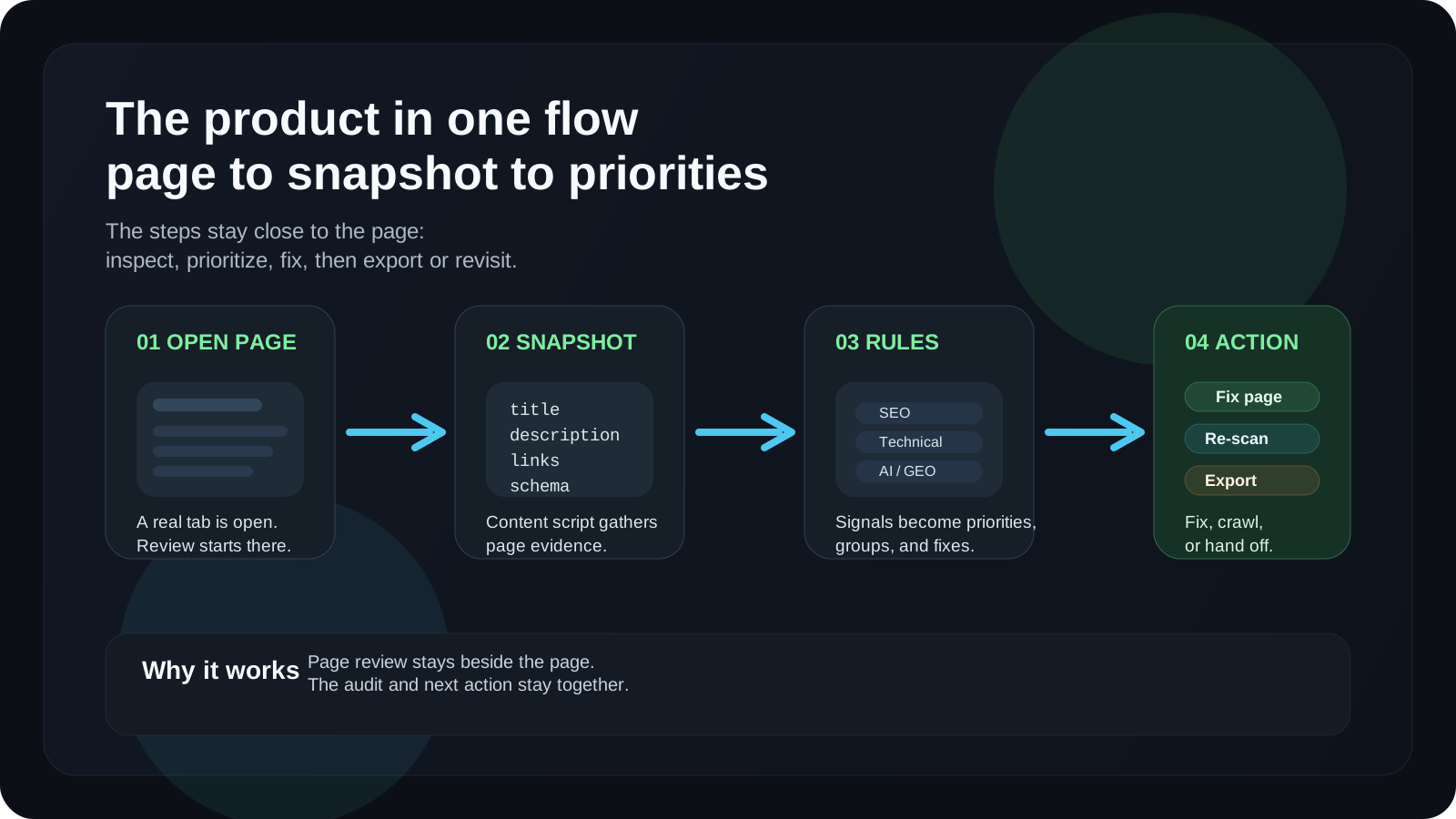
The product in one flow
If I reduce Crowra to one flow, it looks like this:
- The user opens a page.
- The user opens Crowra in the side panel.
- Crowra extracts a page snapshot from the active tab.
- The audit engine runs SEO, technical, schema, links, accessibility, and AI / GEO rules.
- The UI groups issues by priority and category.
- The user fixes the page or starts a same-site crawl.
- The result can be exported as Markdown, JSON, CSV, or saved in local history.
That is the whole product.
The value is not that each check is impossible to do elsewhere.
The value is that the checks live together, beside the page, at the moment when they are needed.
What building Crowra taught me
Building Crowra reinforced a lesson I keep learning across products:
Narrow workflows produce clearer products.
A broad SEO platform can do a thousand things and still feel hard to use. A small side-panel inspector can be useful if it understands the exact moment it exists for.
That does not mean the product should stay small forever.
It means the first version needs a center of gravity.
For Crowra, that center is page review.
Not analytics. Not rankings. Not dashboards. Not team reporting.
A practical audit of the page in front of you.
FAQ
What is Crowra?
Crowra is a Chrome side-panel extension for auditing the active page for SEO, technical health, structured data, links, accessibility, and AI / GEO readiness.
Is Crowra an SEO browser extension?
Yes. Crowra is an SEO browser extension, but it also covers technical checks, schema markup, broken links, accessibility signals, reports, history, and AI / GEO readiness signals.
What does AI / GEO readiness mean in Crowra?
In Crowra, AI / GEO readiness means reviewing signals such as AI-bot access,
llms.txt, content density, E-E-A-T hints, schema-backed entities, and page
clarity. It does not guarantee inclusion in AI-generated answers.
Does Crowra crawl a whole site automatically?
No. The main audit runs on the active page. Same-site crawling starts only when the user triggers it from the Links tab.
Does Crowra require an account?
No. Crowra is designed as a local-first browser extension. Settings, onboarding, custom extractor rules, and scan history are stored locally in Chrome.
Who is Crowra for?
Crowra is for developers, SEOs, marketers, publishers, technical writers, and product teams who need a fast review before publishing, migrating, updating, or cleaning up a page for search and AI discovery.
Related reading:
Discussion
Responses
No approved responses yet.