
Most Next.js architecture advice looks clean because it stops before the hard part.
You get a folder tree, a few arrows, and a confident rule like “keep business logic out of components.” Then the real product arrives: authenticated dashboards, public pages, forms, webhooks, background jobs, cached reads, file uploads, and a mobile app that needs the same data.
That is when the neat diagram starts collecting exceptions.
I have rebuilt the same kind of App Router structure enough times to notice which decisions keep paying rent and which ones only look impressive in a repository screenshot. The architecture that survives is rarely the one with the most layers. It is the one where every new piece of code has an obvious home, and where crossing a boundary is a deliberate act.
So this is how I structure a production Next.js App Router app in 2026. It is not the only valid structure, and it is not a starter template disguised as a universal truth. It is a set of practical defaults for products that have real users, real permissions, and a good chance of still existing a year from now.
The short answer
My default architecture is:
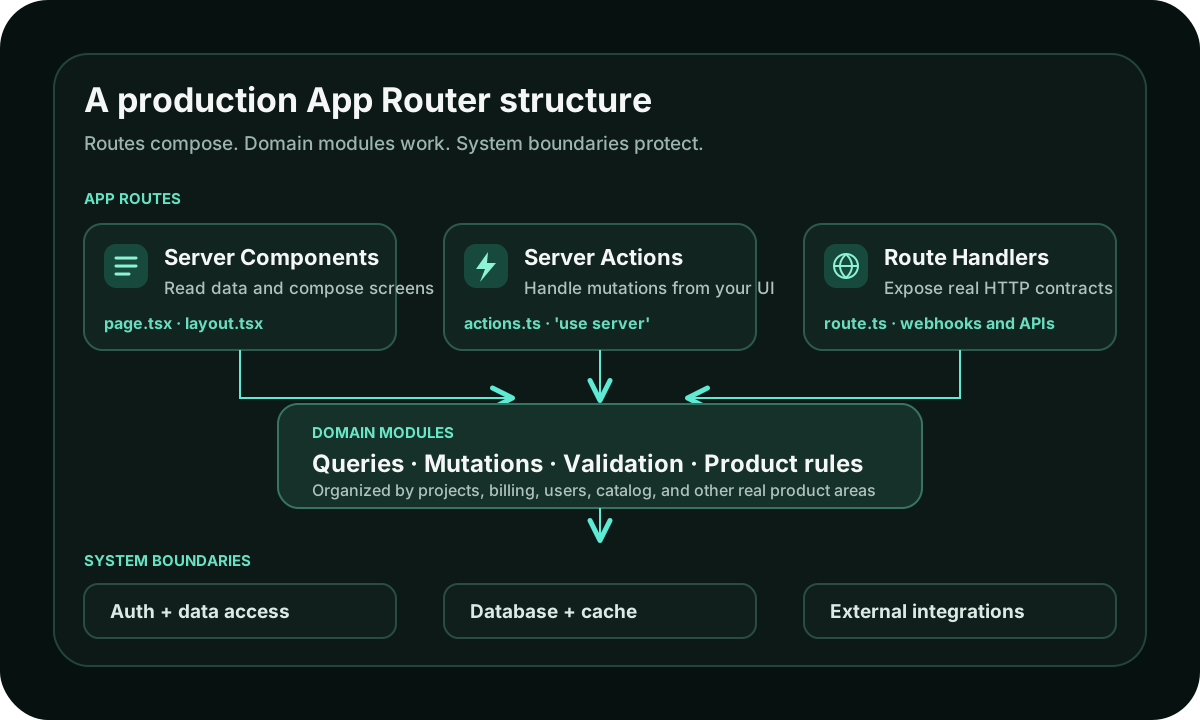
- Routes compose the screen. Pages and layouts decide what appears for a URL.
- Server Components read data. They call server-side query functions directly.
- Client Components own interaction. State, event handlers, browser APIs, and instant feedback stay in small client boundaries.
- Server Actions handle mutations from my own UI. Forms and product actions do not need a private HTTP endpoint by default.
- Route Handlers expose HTTP contracts. I use them for webhooks, public APIs, mobile clients, extensions, feeds, and file responses.
- A data access layer owns authorization. Hiding a button is UX; checking access beside the data is security.
- Caching follows product semantics. I cache because I know how stale a result may be, not because a framework feature exists.
The sentence I keep in my head is:
Routes compose, domain modules do the work, and every boundary validates what enters it.
That is almost the whole architecture.
Start with product boundaries, not technical layers
The official Next.js project structure documentation
is intentionally flexible. The framework gives meaning to files such as
page.tsx, layout.tsx, loading.tsx, and route.ts, but it does not decide
how the rest of your product should be organized.
That freedom is useful. It is also how projects end up with folders called
services, utils, helpers, repositories, and managers, where the only
way to find code is to remember which synonym someone chose six months ago.
I prefer product or domain boundaries.
For a small-to-medium app, the structure often starts like this:
src/
  app/
    (marketing)/
      page.tsx
      pricing/
        page.tsx
    (app)/
      layout.tsx
      projects/
        page.tsx
        loading.tsx
        error.tsx
        [projectId]/
          page.tsx
          _components/
            project-header.tsx
          actions.ts
    api/
      webhooks/
        stripe/
          route.ts
    layout.tsx

  components/
    ui/
      button.tsx
      dialog.tsx

  lib/
    auth/
      dal.ts
    projects/
      queries.ts
      mutations.ts
      schemas.ts
    integrations/
      stripe.ts
    db.ts
This tree is not sacred. The useful part is the direction of ownership.
The app directory owns routing and screen composition. lib/projects owns
the reusable server-side rules for projects. lib/auth owns session and
permission checks. components/ui contains genuinely shared interface pieces.
The Stripe webhook is public because a route.ts makes it public; the Stripe
client itself lives outside the route so other server code can reuse it.
I colocate a component inside a route when that route is the only place using
it. I move it to a shared folder only after it becomes shared. Starting with
everything in components feels organized for about a week, then turns the
folder into a warehouse.
Route groups such as (marketing) and (app) are useful because they let me
separate layouts and product areas without changing the URL. Private folders
such as _components make it clear that a folder is an implementation detail,
not another route segment.
The goal is not a perfect tree. The goal is that someone opening
app/(app)/projects/[projectId]/page.tsx can follow the feature without touring
the entire repository.
Let routes compose; do not make them carry the business
A page should be readable as a description of the screen.
// app/(app)/projects/[projectId]/page.tsx
import { notFound } from 'next/navigation';
import { getProjectForUser } from '@/lib/projects/queries';
import { ProjectHeader } from './_components/project-header';
import { ProjectActivity } from './_components/project-activity';

export default async function ProjectPage({
  params,
}: {
  params: Promise<{ projectId: string }>;
}) {
  const { projectId } = await params;
  const project = await getProjectForUser(projectId);

  if (!project) notFound();

  return (
    <main>
      <ProjectHeader project={project} />
      <ProjectActivity projectId={project.id} />
    </main>
  );
}
The route knows the URL, chooses the data needed for the screen, and composes the interface. It does not contain a forty-line database query, permission rules, Stripe mapping, and email side effect.
I am not dogmatic about extracting every three-line query. A tiny page can be a tiny page. I extract logic when it represents a reusable product rule, contains security-sensitive behavior, or makes the route hard to scan.
That threshold matters. Architecture can become a way of hiding simple code
behind five jumps. If opening a user profile requires following
page -> service -> repository -> adapter -> client and each layer forwards
the same arguments, the layers are not protecting anything. They are charging
navigation tax.
Server Components are the default, not the whole strategy
App Router pages and layouts are Server Components by default. I keep them that way for as long as the browser is not required.
That means Server Components usually handle:
- initial data reads
- permission-aware rendering
- page and layout composition
- secret-dependent work
- expensive formatting
- SEO-critical content
- passing small, serializable props into interactive children
The browser boundary begins where interaction begins: state, event handlers, effects, refs, browser APIs, or a library that depends on the DOM.
I do not measure success by having zero Client Components. A search input that
feels immediate is doing useful client work. A sortable table may be easier to
use when some state stays in the browser. The mistake is moving an entire page
behind 'use client' because one leaf needs onClick.
Once a module becomes a client boundary, its imported module graph joins the client bundle. Keeping that boundary low protects the rest of the route without making the interface less interactive.
I wrote the component-level rules in more detail in Server vs Client Components in Next.js. The architectural version is simpler: the server owns the screen; the client owns interaction moments.
Read data directly on the server
One habit from older React architectures is surprisingly hard to drop: calling your own API from your own server-rendered page.
// Avoid this inside a Server Component
const response = await fetch(`${process.env.APP_URL}/api/projects`);
const projects = await response.json();
That request leaves server code, enters an HTTP endpoint in the same application, parses a response, and often repeats authentication that was already available. It adds a network-shaped boundary without gaining an actual external client.
I call the query function directly instead:
const projects = await getProjectsForCurrentUser();The query function can still enforce access, shape the returned data, and be tested independently. A Route Handler can call the same underlying function if a mobile app later needs an endpoint.
This separation gives me two reusable things:
- a server-side capability, such as
getProjectsForUser(userId) - an optional HTTP representation of that capability
The HTTP layer is no longer the business logic. It is one way into it.
That is the distinction that keeps a Next.js backend from turning into a set of endpoints the frontend has to call even when both sides are already running in the same process.
Put authorization beside data access
Authentication answers “who is this?” Authorization answers “may this person do this specific thing?” The second question is where production apps usually get interesting.
I centralize those checks in a small data access layer and in domain query or mutation functions.
// lib/projects/queries.ts
import { verifySession } from '@/lib/auth/dal';
import { db } from '@/lib/db';

export async function getProjectForUser(projectId: string) {
  const session = await verifySession();

  return db.project.findFirst({
    where: {
      id: projectId,
      members: { some: { userId: session.userId } },
    },
    select: {
      id: true,
      name: true,
      status: true,
      updatedAt: true,
    },
  });
}
Notice that ownership is part of the query. I do not fetch any project by ID
and then hope every caller remembers to compare a userId afterward.
I also return only the fields the screen needs. That is less about ceremony and more about making accidental data exposure harder. A Server Component does not send all its code to the browser, but data passed into a Client Component still crosses the server-client boundary. Smaller, intentional objects are easier to reason about.
Layouts and Proxy can perform optimistic checks for navigation and UX, but I do not treat them as the final security boundary. The official Next.js authentication guide recommends secure checks close to data access and explicitly says to treat both Server Actions and Route Handlers like public-facing entry points.
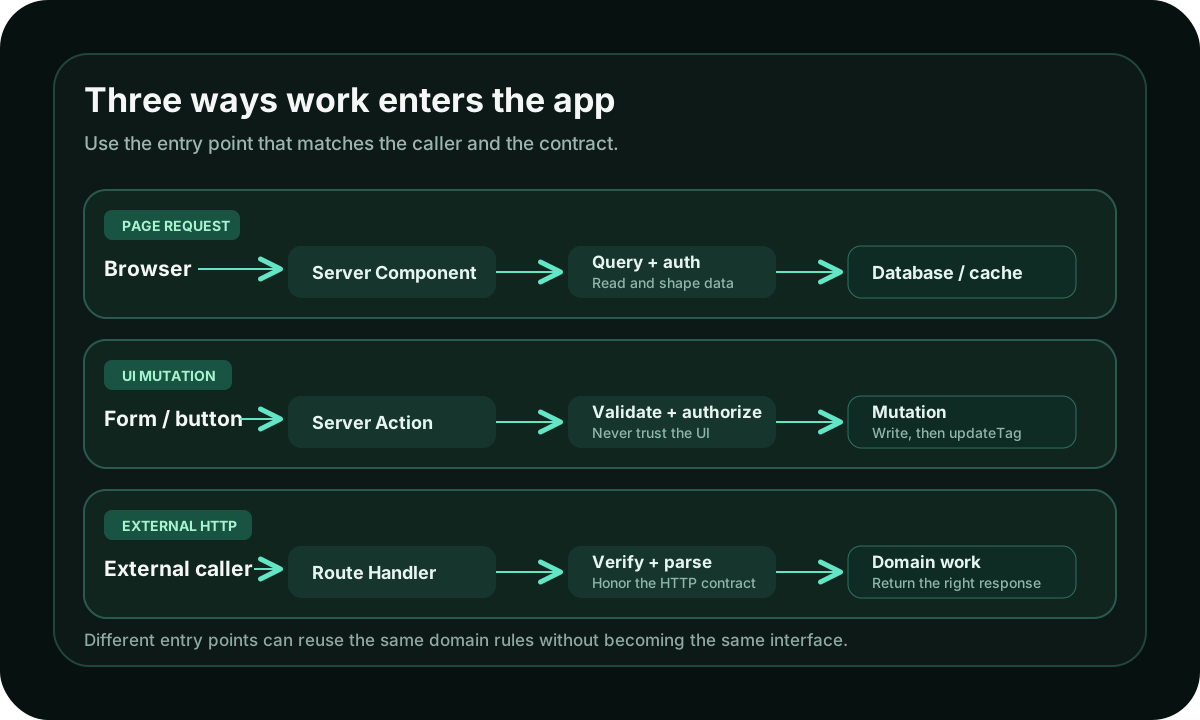
That matches the rule I use: every mutation re-checks authorization, even if the button that triggered it was visible only to an admin.
Use Server Actions for mutations owned by your UI
If a form or button in my Next.js interface triggers a mutation, I usually start with a Server Action.
// app/(app)/projects/[projectId]/actions.ts
'use server';

import { updateTag } from 'next/cache';
import { verifySession } from '@/lib/auth/dal';
import { renameProjectForUser } from '@/lib/projects/mutations';
import { renameProjectSchema } from '@/lib/projects/schemas';

export async function renameProject(input: unknown) {
  const session = await verifySession();
  const parsed = renameProjectSchema.safeParse(input);

  if (!parsed.success) {
    return { ok: false, errors: parsed.error.flatten().fieldErrors };
  }

  await renameProjectForUser({
    ...parsed.data,
    userId: session.userId,
  });

  updateTag(`project-${parsed.data.projectId}`);
  return { ok: true };
}
This example assumes Cache Components are enabled; I will get to that detail in a moment.
The important architecture is outside the syntax. The action is an entry point. It verifies the session, validates untrusted input, calls a domain mutation, and updates the relevant cached read. The deeper mutation owns the database transaction and the rule that this user may rename this project.
That makes the action small enough to understand without making it useless.
I do not put a Server Action in a global actions.ts just because all actions
share a directive. I colocate route-specific actions with their route and move
shared actions into the relevant domain module when reuse becomes real.
For a deeper comparison, see Server Actions vs API Routes in Next.js.
Use Route Handlers when HTTP is part of the product
A Route Handler is the right tool when the URL itself is a contract.
I use one for:
- payment and authentication webhooks
- endpoints called by a mobile app or browser extension
- public or partner APIs
- OAuth callbacks
- RSS, XML, calendar, and file responses
- endpoints that need explicit HTTP methods, headers, or status codes
// app/api/webhooks/stripe/route.ts
import { handleStripeEvent } from '@/lib/integrations/stripe';

export async function POST(request: Request) {
  const body = await request.text();
  const signature = request.headers.get('stripe-signature');

  if (!signature) {
    return new Response('Missing signature', { status: 400 });
  }

  await handleStripeEvent({ body, signature });
  return new Response('OK');
}
The route owns the HTTP concerns. The integration module verifies the signature, interprets the event, and performs idempotent work. That split makes it possible to test the integration without constructing a framework request for every case.
I do not create a Route Handler only because “backend code belongs under
/api.” In an App Router project, server code can live wherever the server-side
domain needs it. A Route Handler is for a real request boundary.
The complete decision rules are in Next.js API Routes in 2026.
Validate at the boundary, then work with trusted data
TypeScript does not validate a form submission, JSON body, URL parameter, or webhook payload. It describes what our code expects after the value has entered the program.
So I validate at every place untrusted data enters:
- Server Action arguments and
FormData - Route Handler bodies, query strings, and headers
- dynamic route parameters when the accepted format matters
- environment variables during startup
- responses from third-party services when a bad shape would be expensive
After validation, I pass a narrow typed object into the domain function. I do
not pass the whole Request, FormData, or framework-specific object through
three layers.
This keeps the center of the application boring in a good way. Domain code
works with values such as { projectId, name, userId }, while entry points deal
with browsers, HTTP, parsing, and error responses.
It also makes testing much more direct. A permission rule or database mutation does not need a fake Next.js request to prove that it works.
Cache according to how the product may be stale
Caching is the part of App Router architecture where generic advice ages fastest.
In Next.js 16, Cache Components are available behind the cacheComponents
configuration flag. When enabled, the model centers on 'use cache',
cacheLife, cacheTag, updateTag, and revalidateTag. If the flag is not
enabled, the previous caching model still applies.
I make that choice explicit in the project instead of mixing examples from both models.
// next.config.ts
import type { NextConfig } from 'next';

const nextConfig: NextConfig = {
  cacheComponents: true,
};

export default nextConfig;
For public data that can be a few minutes old, a cached query may look like this:
// lib/catalog/queries.ts
import { cacheLife, cacheTag } from 'next/cache';
import { db } from '@/lib/db';

export async function getPublicCatalog() {
  'use cache';
  cacheLife('minutes');
  cacheTag('catalog');

  return db.product.findMany({
    where: { published: true },
    orderBy: { updatedAt: 'desc' },
  });
}
After an editor changes a product, the invalidation depends on what the user expects:
updateTag('catalog')expires it immediately. This fits a read-your-own-writes flow where the editor should see the change now.revalidateTag('catalog', 'max')serves stale data while refreshing in the background. This fits content where a short delay is acceptable.revalidatePath('/catalog')invalidates a route. It is useful, but less precise than invalidating the data shared by several routes.
The official Cache Components guide and revalidation guide describe the current APIs. The architecture decision still belongs to the product: how stale can this be, who must see a write immediately, and how large is the cost of recomputing it?
I break down the full model, including Suspense, cache keys, runtime storage, and invalidation behavior, in Next.js Caching in 2026.
I am conservative with personalized and permission-sensitive data. Passing a verified user ID into a carefully scoped cached function is very different from putting a broad cache around a function that reads session state and returns private rows. If the security story is not obvious, I leave the query dynamic until it is.
A page that is correct and slightly slower is easier to improve than a fast page that occasionally shows the wrong person's data.
Make loading, errors, and empty states part of the route
Production architecture is not only where successful data comes from. It is also where waiting and failure live.
The App Router gives each segment natural places for those states:
projects/
  page.tsx
  loading.tsx
  error.tsx
  not-found.tsx
I keep a loading boundary near the slow work it represents. A dashboard should not turn into one giant spinner because one activity panel is waiting on a slower query. Suspense boundaries and route-level loading files are architecture tools because they decide which parts of the screen can arrive independently.
The same goes for errors. A useful error.tsx should let the user recover or
retry when that makes sense. not-found.tsx should describe a missing resource,
not catch every permission failure and server exception under the same vague
message.
Empty states belong in the normal component path. “No projects yet” is not an error; it is a valid product state, often with the most important call to action on the page.
These files are easy to postpone because the happy path demos well. They are also what makes an application feel deliberate once the network, database, and users stop behaving perfectly.
Keep third-party systems behind small server modules
Payment providers, email clients, analytics APIs, AI models, and storage SDKs change faster than the product concepts around them.
I keep those SDK details in small modules under something like
lib/integrations. The rest of the app asks for an outcome:
await sendProjectInvitation({ email, projectName, inviteUrl });It does not build a provider-specific payload inside a Server Action.
This is one place where an abstraction earns its keep. It protects the product code from vendor types, centralizes retries and observability, and gives me one place to handle a provider's strange edge cases.
I still avoid a grand universal EmailService with five implementations nobody
plans to use. A small function with a product-shaped name is usually enough.
Background jobs deserve a similarly explicit boundary. A Server Action or Route Handler can enqueue work, but long-running or retryable tasks should not pretend the original request will remain alive forever. The queue and worker may live outside Next.js; the important part is that the request path hands off the job intentionally and records enough state to retry it safely.
The folder structure should grow after the problem does
I have a rough progression for Next.js project structure.
At the beginning, I colocate aggressively. A page, its small components, and an
action can live together. Shared UI goes into components/ui. Database access
can start in a focused lib module.
As the product grows, I extract around pressure:
- repeated permission checks become a data access function
- repeated business rules become a domain mutation
- an external client creates a real Route Handler
- a provider SDK gets an integration module
- several routes sharing data get a cache tag strategy
- a slow section gets its own Suspense boundary
I do not add a repository layer because a diagram says applications have one. I add it when database details genuinely need isolation or multiple callers are duplicating query behavior. I do not add a global state library because the app has state. I add one when URL state, server state, local state, and context no longer cover a real cross-screen interaction cleanly.
The best Next.js architecture is usually one step ahead of current complexity, not six steps ahead of imaginary scale.
A practical request walkthrough
Imagine a user renames a project from a dashboard.
Here is the full path I want:
- A Server Component loads the project through
getProjectForUser. - The page passes the project name and ID to a small interactive form.
- The form calls a colocated Server Action.
- The action verifies the session and validates the submitted values.
- A domain mutation updates only a project the user may edit.
- The mutation completes before the relevant cache tag is invalidated.
- The UI shows the new name immediately and handles validation errors without losing the form state.
Now imagine Stripe changes that project's subscription.
- Stripe calls a Route Handler at a stable public URL.
- The handler reads the raw body and required signature header.
- The integration module verifies the signature.
- The event handler checks idempotency before changing the database.
- The relevant subscription and project cache tags are revalidated.
- The handler returns the HTTP status Stripe expects.
The database mutation may touch the same project in both flows. The entry points are different because the callers and contracts are different.
That is what I mean by boundaries. They are not folders for their own sake. They describe who is calling, what can be trusted, and what kind of response is required.
Mistakes I would avoid in a new App Router project
These are the patterns I now treat as early warnings:
- putting
'use client'on a page because one nested control is interactive - fetching your own Route Handler from a Server Component
- trusting a layout redirect as the only authorization check
- putting every Server Action in one global file
- caching private data before the ownership model is clear
- invalidating the entire route when one tagged query changed
- returning full database records to interactive components
- passing
RequestorFormDatadeep into domain code - creating
utils.tsas the default home for unrelated logic - adding service and repository layers that only forward arguments
- performing a long retryable job inside the original request
- treating
loading.tsx,error.tsx, and empty states as final-week polish
None of these choices automatically ruins a project. I have shipped several of them. The problem is accumulation. Each one makes the next feature slightly harder to place, slightly harder to secure, or slightly harder to debug.
Good architecture is mostly the absence of that friction.
The production checklist I actually use
Before I call an App Router feature complete, I ask:
- Can I understand the route by reading its page and layout?
- Is the client boundary limited to code that needs browser capability?
- Does server-rendered code call domain queries directly?
- Does every Server Action validate input and re-check authorization?
- Does every Route Handler behave like a public endpoint?
- Are sensitive reads scoped by ownership in the data access layer?
- Is the returned data narrower than the database record?
- Does the cache policy state how stale the data may be?
- Will the user see their own write when they expect to?
- Are loading, empty, not-found, and error states intentional?
- Can external events be retried without duplicating work?
- Is shared code actually shared, or merely predicted to be shared?
If the answers are clear, the folder tree is usually fine.
FAQ
What is the best Next.js App Router architecture in 2026?
There is no single best folder tree. A strong default is to let routes compose screens, use Server Components for reads, keep Client Components focused on interaction, use Server Actions for UI-owned mutations, use Route Handlers for real HTTP contracts, and centralize authorization close to data access.
How should I organize a Next.js App Router project?
Organize routes by URL and product area inside app, colocate route-specific
components and actions, keep truly shared UI in a shared components folder, and
group reusable server logic by domain such as projects, billing, or auth.
Add technical layers only when they remove real duplication or isolate a real
boundary.
Should a Server Component call a Next.js Route Handler?
Usually no. If both live in the same application, call the shared server-side query or domain function directly. Use a Route Handler when an external client or an HTTP-specific contract actually needs the endpoint.
Where should authentication and authorization live in Next.js?
Session verification can be centralized in a data access layer, while secure authorization checks should also happen close to each sensitive query and mutation. Layouts and Proxy can improve navigation and UX, but they should not be the only protection for private data or actions.
Should I use Server Actions or Route Handlers for mutations?
Use a Server Action when the mutation is triggered by your own Next.js UI. Use a Route Handler when a webhook, mobile app, extension, partner, or other HTTP client needs a stable endpoint. Both must validate input and check permissions.
Do I need a service and repository layer in Next.js?
Not by default. Add a layer when it isolates meaningful complexity, protects a domain rule, or removes duplication. If it only forwards the same arguments to the next file, it is probably making the code harder to follow without making it safer.
Conclusion
The App Router gives us more useful primitives than older Next.js applications had: Server Components, nested layouts, streaming boundaries, Server Actions, Route Handlers, and explicit caching controls. More primitives do not require a more elaborate architecture. They require clearer decisions about where each kind of work belongs.
My production Next.js architecture in 2026 is intentionally plain. Routes compose screens. Server Components read. Client Components interact. Server Actions mutate for the UI. Route Handlers speak HTTP. Domain modules protect the rules that should survive all of those entry points.
The structure will change as the product grows. That is healthy. The important part is that it grows in response to real pressure, while the path from a user action to a permission check to a database write stays short enough to hold in your head.
That is the kind of architecture I trust in production: not the one that looks most advanced on day one, but the one that still makes sense when the simple app is no longer simple.
Discussion
Responses
No approved responses yet.